踊るVBEアドインを使う(今さら)
踊るVBEアドインを使う(今さら)
しばらくVBAから遠ざかっていたのですが、最近またぐりぐりにVBAを書く機会が増えました。
……となると、どうしても困るのが開発環境の貧弱さ……。
コメントアウトしようとして何度Ctrl + / を押してしまったことか……。
いや、待てよ……。
踊るVBEアドインがあったじゃないか!!!!
……というわけで、(当方、ずいぶん前から存在を知っていた割には全然使いこなせていませんが、)素晴らしすぎる機能の一端(ほんとに〝一端〟に過ぎなくて作者様には申しわけないのですが。)をご紹介しましょう。
踊るVBEアドインとは
作者である(株)踊るExcel様によると、
VBAerの VBAerによる VBAerの為の VBEアドイン
(VBE-AddIn of the VBAer, by the VBAer, for the VBAer)
との由。
ちなみに、Word VBA界の偉人みんなのワードマクロ様もブログ内で紹介していたりします。
踊るVBEアドインのインストール
使用中のPCに「踊るVBEアドイン」を闘魂注入する方法はコチラで詳しく解説されているので、私が付け加えることは何もないのですが、それでは私の立つ瀬がないので、スクショだけコチラでご紹介しておきます。
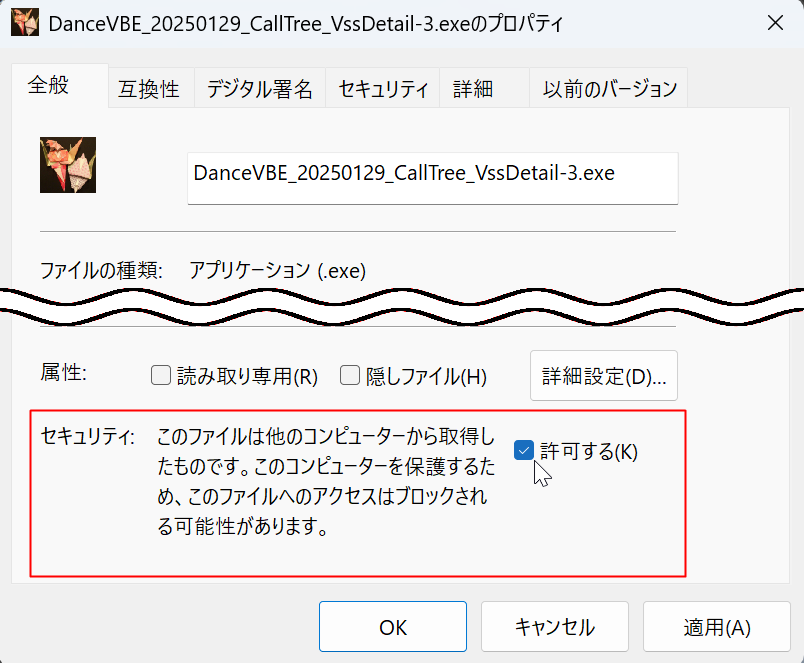
zipファイルをダウンロード、展開したら生えてくるexeファイルのアイコンを右クリックして「プロパティ」を表示させたところです。
「セキュリティ」のところの「許可する」にチェックを入れておきます。
作者の方を個人的に存じ上げておりますが、フツーにまともな好人物なので、安心してチェックを入れることができます。
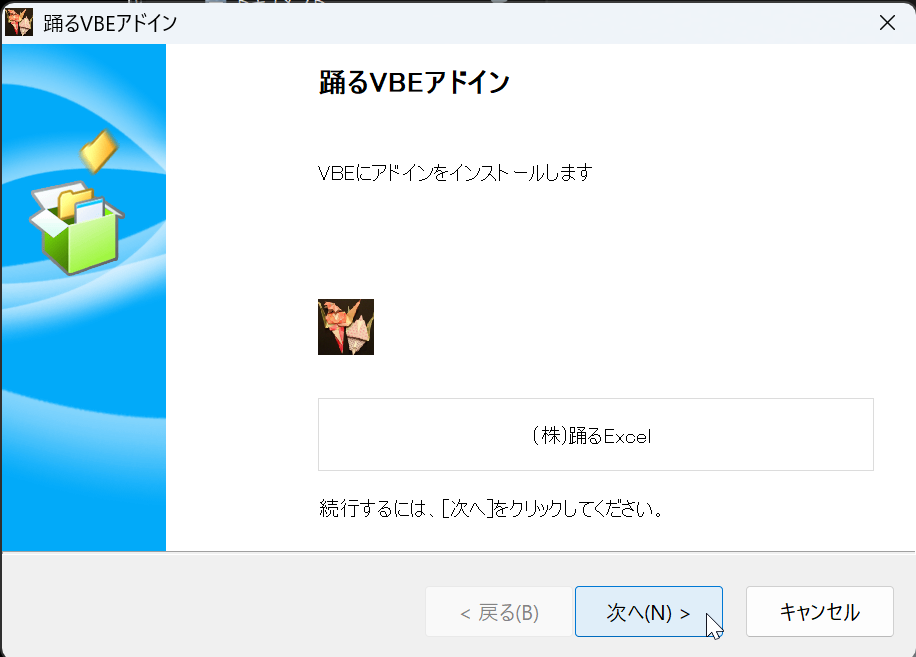
exeファイルのアイコンをダブルクリックするとこんなウィンドウが。迷わず「次へ」をクリックです。
(迷わず行けよ、行けばわかるさ!)
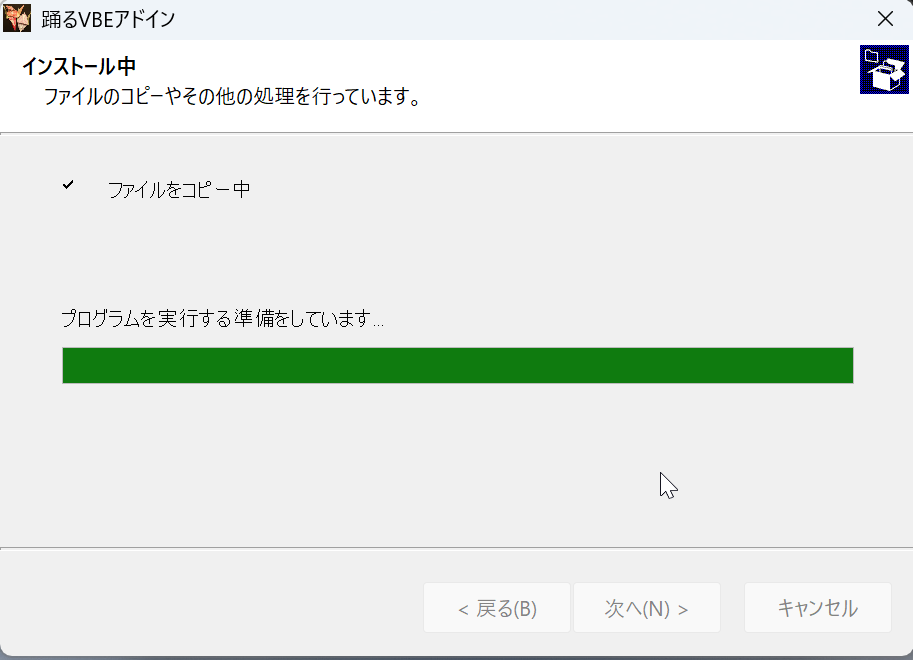
しばらくあれこれやっています。
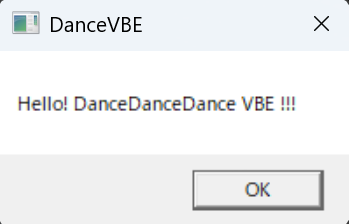
こいつが出てきたら完了です。
一見、PCに何も起こっていないように見えますが、大丈夫です。
バッチリ、PCには「踊るVBEアドイン」が闘魂注入されています。
VBEを開いてみる
神機能その1
ここで、テキトーにマクロ入りのExcelブックを開いてみましょう。
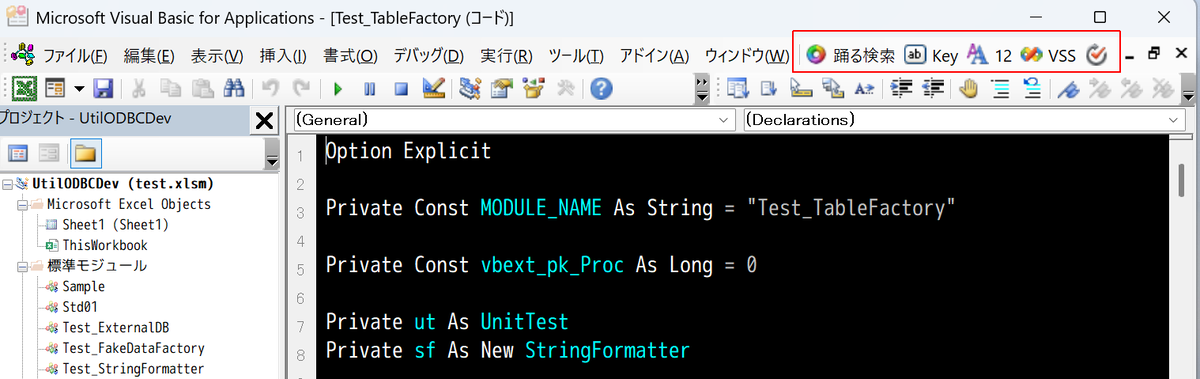
何やら見慣れないアイコンどもが……。
試しに「Key」と書かれたアイコンをクリックしてみます。
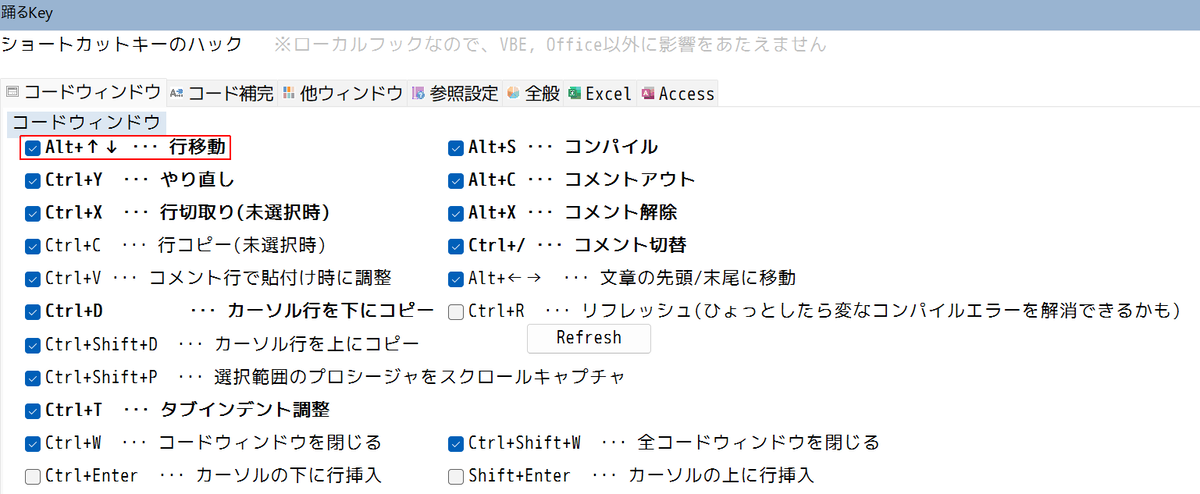
なんと、ショートカットキーたちです。
なんか、先頭にすごいことが書いてありません?
Alt+↑↓ ‣‣‣ 行移動
ですって……?
ま、まさか……。
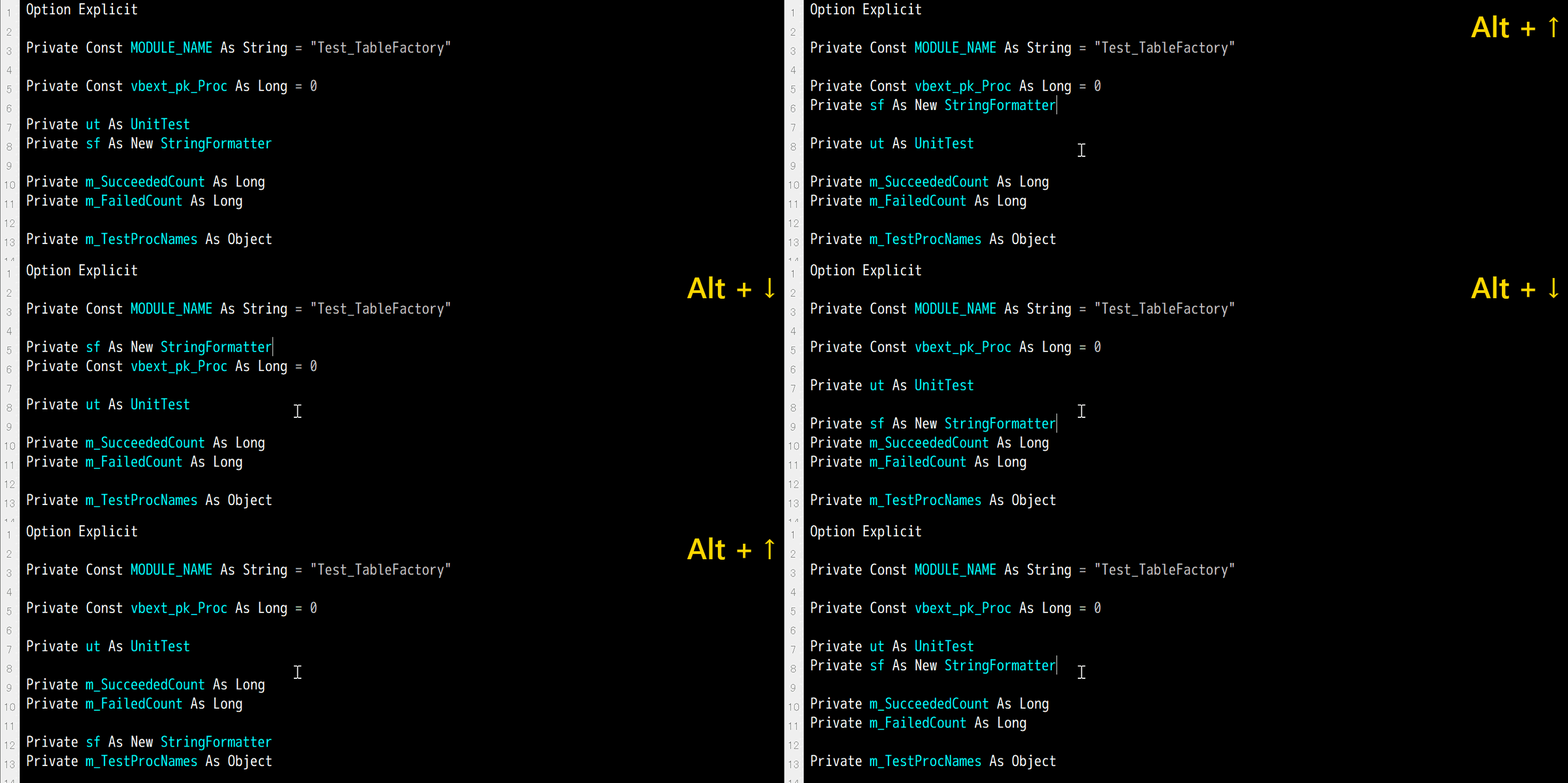
はい、その「まさか」です!
なんと、行移動ができてしまうのです!
もう、この機能のためだけに「踊るVBEアドイン」を導入しても損はない!
個人的にはそんな〝神機能〟だと思います。
神機能その2
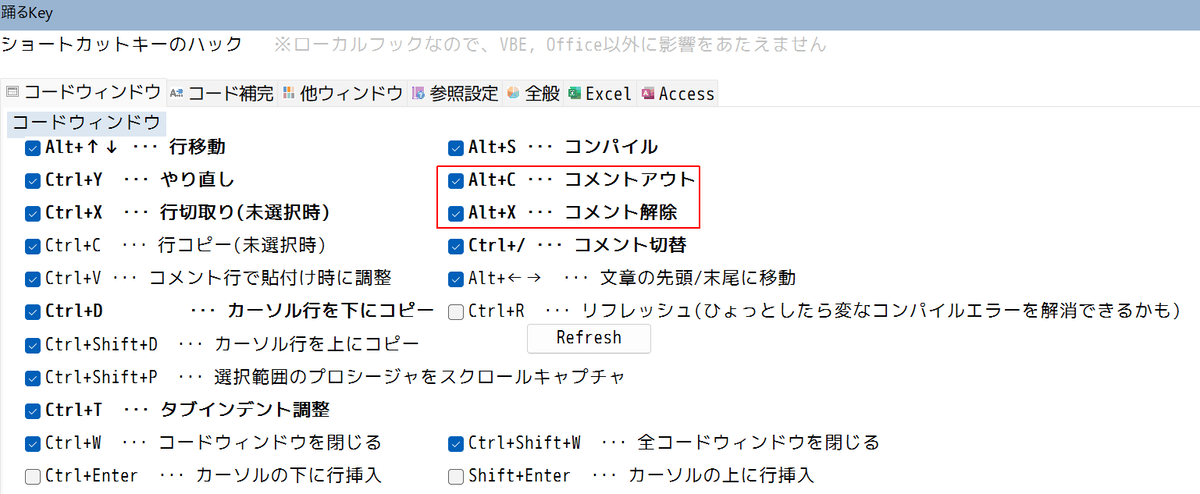
なんか、しれっとすごいことが書いてありますね。
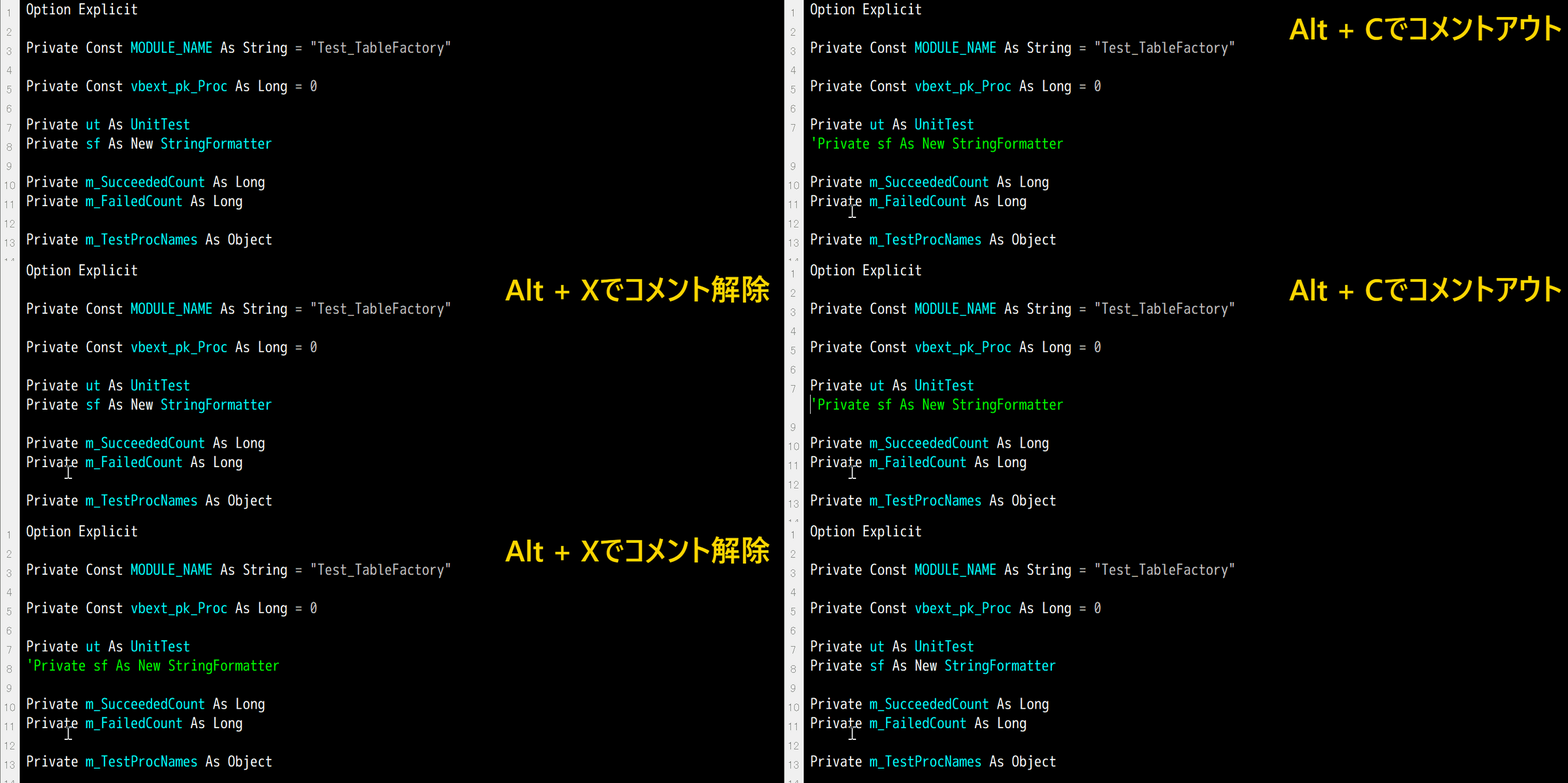
そう、VBEではクソめんどくさかったコメントアウト・コメント解除がショートカットキーでできるようになるのです!
もう、この機能のためだけに「踊るVBEアドイン」を導入しても損はない!
これまた、個人的にはそんな〝神機能〟だと思います。
おわりに
私はこの〝神アドイン〟を全然使いこなせていませんが、今回ご紹介した機能だけでも、全てのVBA使いに試してもらいたいと思います。
個人的には、モジュールのソースコードの差分管理ができる〝リポジトリ機能〟(←でいいのか?)も重宝しているので、また機会を改めてご紹介したいと思っています。
VBAのコードでVBAのモジュールを生成する
VBAのコードでVBAのモジュールを生成する
VBAのコードを実行することによって、プロジェクトに標準モジュールやらクラスモジュールやらを挿入することができます。
手順の紹介
次のような手順で行います。
なお、ホストアプリケーションはExcelとします。
- トラスト センターの「開発者向けのマクロ設定」で、「VBA プロジェクト オブジェクト モデルへのアクセスを信頼する」にチェックを入れる
Workbookオブジェクトにぶら下がるVBProjectオブジェクトを取得するVBProjectオブジェクトにぶら下がるVBComponentsコレクションのAdd()メソッドを叩いてVBComponentオブジェクトを取得するVBComponentオブジェクトにぶら下がるCodeModuleオブジェクトを取得するCodeModuleオブジェクトにコードを追加する
実装
開発者向けのマクロ設定
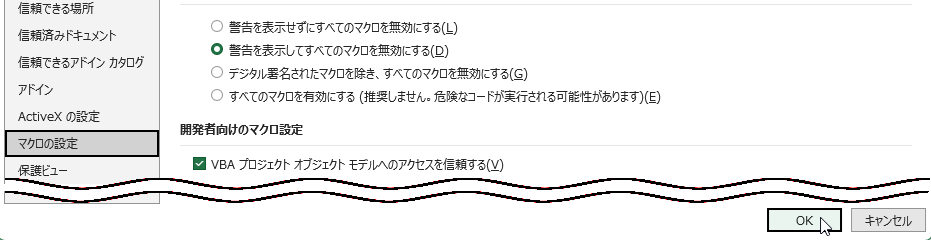
Excelの「ファイル」->「オプション」メニューから「トラスト センター」を開き、「開発者向けのマクロ設定」のセクションで「VBA プロジェクト オブジェクト モデルへのアクセスを信頼する」にチェックを入れましょう。
これで、VBAからVBEをごにょごにょできるようになります。
ここからはVBEでの作業です。
VBProjectオブジェクトの取得
リスト1-1
Private Sub InsertStandardModuleTest()
    Dim vp As Object
    Set vp = ThisWorkbook.VBProject

End Subまず、WorkbookオブジェクトのVBProjectプロパティを叩くことにより、VBProjectオブジェクトを取得し、変数vpに叩き込みます。
「Microsoft Visual Basic for Applications Extensibility X.X」を参照設定していれば、
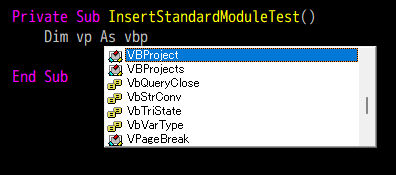
このようにヒントが出ますが、今回は参照設定をせずに進めるので、Object型の変数を用います。
VBComponentオブジェクトの取得
リスト1-2
Private Const vbext_ct_StdModule As Long = 1

Private Sub InsertStandardModuleTest()
    Dim vp As Object
    Set vp = ThisWorkbook.VBProject

    Dim vc As Object
    Set vc = _
        vp.VBComponents.Add( _
            ComponentType:=vbext_ct_StdModule _
        )
    vc.Name = "Aho"

End Subさきほど取得したVBProjectオブジェクトのVBComponentsプロパティを叩いてVBComponentsコレクションオブジェクトを取得し、そのAdd()メソッドを叩いてVBComponentオブジェクトを取得します。
取得したVBComponentオブジェクトは即座に変数vcに叩き込みます。
今回は、VBComponentオブジェクトの種類として標準モジュールを指定したいので、Add()メソッドの引数ComponentTypeには1を渡します。
ただ、1では何のことかわからないので、「Microsoft Visual Basic for Applications Extensibility」にある列挙体vbext_ComponentType列挙体のメンバを調べて、モジュールの宣言セクションで
Private Const vbext_ct_StdModule As Long = 1このように、定数として設定しています。
また、取得後のVBComponentオブジェクト、すなわち標準モジュールには、
vc.Name = "Aho"このように、即座にAhoと名前を付けています。
CodeModuleオブジェクトの取得
リスト1-3
Private Const vbext_ct_StdModule As Long = 1

Private Sub InsertStandardModuleTest()
    Dim vp As Object
    Set vp = ThisWorkbook.VBProject

    Dim vc As Object
    Set vc = _
        vp.VBComponents.Add( _
            vbext_ct_StdModule _
        )
    vc.Name = "Aho"

    Dim cm As Object
    Set cm = vc.CodeModule

End SubVBComponentオブジェクトのCodeModuleプロパティを叩いてCodeModuleオブジェクトを取得し、即座に変数cmに叩き込んでいます。
先ほどのVBComponentオブジェクトが標準モジュールの〝外側〟だとしたら、このCodeModuleオブジェクトは標準モジュールの中身、すなわちコード編集機能に相当する、とでも考えたら良いでしょうか。
CodeModuleオブジェクトに闘魂注入!
あとは、CodeModuleオブジェクトにプロシージャのソースコードを闘魂注入しましょう。
リスト1-4
Private Const vbext_ct_StdModule As Long = 1

Private Sub InsertStandardModuleTest()
    Dim vp As Object
    Set vp = ThisWorkbook.VBProject

    Dim vc As Object
    Set vc = _
        vp.VBComponents.Add( _
            vbext_ct_StdModule _
        )

    vc.Name = "Aho"

    Dim cm As Object
    Set cm = vc.CodeModule

    Dim codeText As String
    codeText = _
        Join( _
            Array( _
                "Private Sub Aori()", _
                vbTab & "Debug.Print ""ち~ん(笑)""", _
                "End Sub" _
            ), _
            vbNewLine _
        )
    Call cm.InsertLines( _
        Line:=cm.CountOfLines + 1, _
        String:=codeText)
End Subまず、Join()関数とArray()関数を組み合わせて、プロシージャの文字列を組み立てます。
Private Sub Aori()
    Debug.Print "ち~ん(笑)"
End Sub
最終的にこのような文字列が吐き出されるよう工夫しています。
組み立てた文字列を変数codeTextに叩き込んだら、あとはCodeModuleオブジェクトのInsertLines()メソッドを用いて、文字列を闘魂注入します。
第1引数Lineには、cm.CountOfLinesを渡しています。
CodeModuleオブジェクトのCountOfLinesプロパティは、文字通り当該モジュールに何行あるかを返します。それに1を足すことで、すでにある記述の次の行に闘魂注入することになります。
第2引数Stringには、闘魂注入したい文字列を指定します。
動作確認
では、出来上がったInsertStandardModuleTest()プロシージャを実行してみましょう。
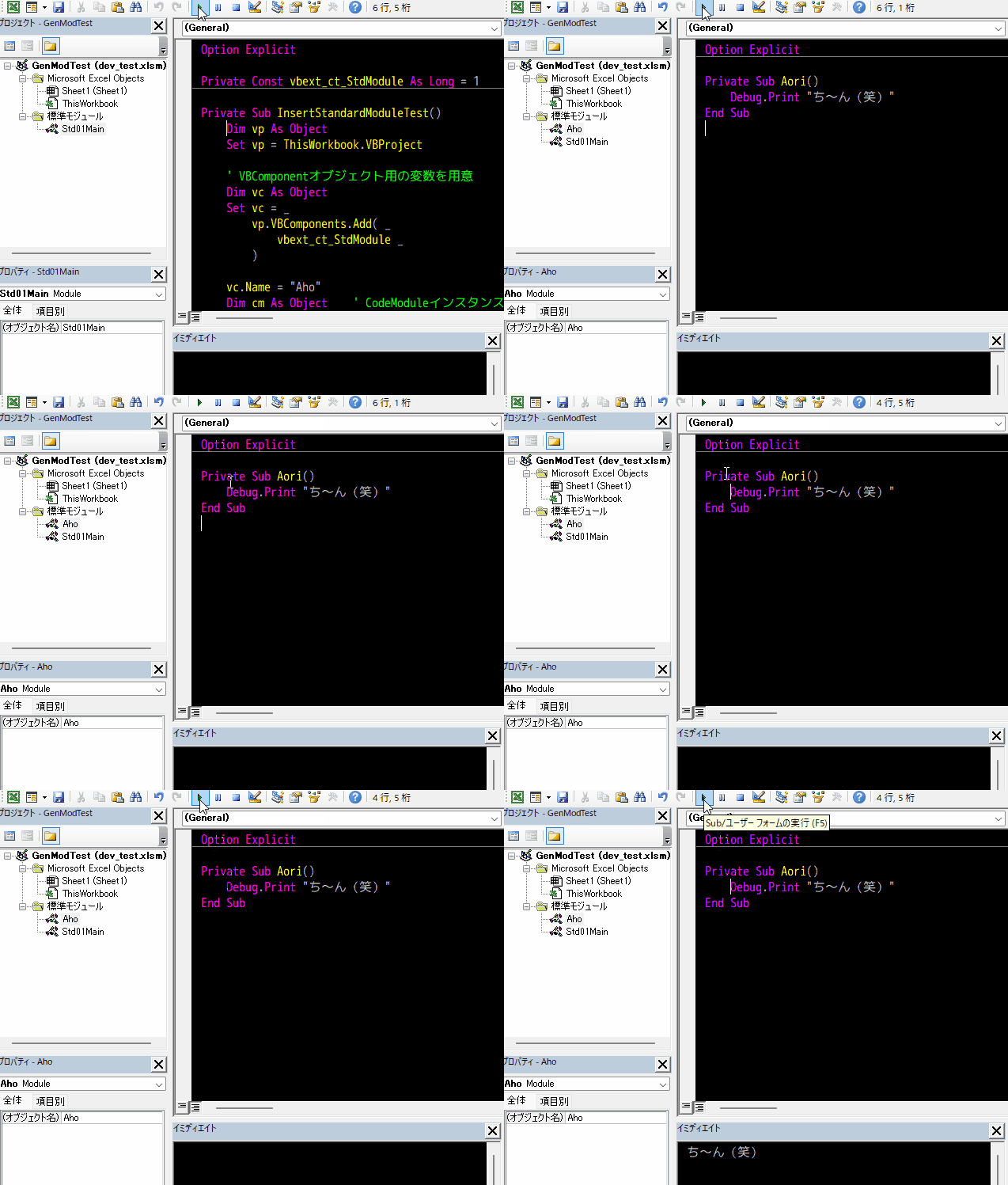
このとおり、Ahoという名前の標準モジュールが生えてきて、しかもちゃんと実行できます。
おわりに
これは、かなり面白いことができそうな予感がします。
個人的には、これを使ってTDDへの道を踏み出せるのではないか、と思っています。
Microsoft Visual Basic for Applications Extensibility X.X用列挙体(コピペ用)
Microsoft Visual Basic for Applications Extensibility X.X用列挙体(コピペ用)
標題のとおりです。
遅延バインディングだと、引数にわかりやすい列挙体が使えなくて不便です。
そういうときは、列挙体を丸パクリしてモジュールに貼り付ければよいのです。
vbext系列挙体
Public Enum vbext_CodePaneView
    vbext_cv_ProcedureView = 0
    vbext_cv_FullModuleView = 1
End Enum

Public Enum vbext_ComponentType
    vbext_ct_StdModule = 1
    vbext_ct_ClassModule = 2
    vbext_ct_MSForm = 3
    vbext_ct_ActiveXDesigner = 11
    vbext_ct_Document = 100
End Enum

Public Enum vbext_ProcKind
    vbext_pk_Proc = 0
    vbext_pk_Let = 1
    vbext_pk_Set = 2
    vbext_pk_Get = 3
End Enum

Public Enum vbext_ProjectProtection
    vbext_pp_none = 0
    vbext_pp_locked = 1
End Enum

Public Enum vbext_ProjectType
    vbext_pt_HostProject = 100
    vbext_pt_StandAlone = 101
End Enum

Public Enum vbext_RefKind
    vbext_rk_TypeLib = 0
    vbext_rk_Project = 1
End Enum

Public Enum vbext_VBAMode
    vbext_vm_Run = 0
    vbext_vm_Break = 1
    vbext_vm_Design = 2
End Enum

Public Enum vbext_WindowState
    vbext_ws_Normal = 0
    vbext_ws_Minimize = 1
    vbext_ws_Maximize = 2
End Enum

Public Enum vbext_WindowType
    vbext_wt_CodeWindow = 0
    vbext_wt_Designer = 1
    vbext_wt_Browser = 2
    vbext_wt_Watch = 3
    vbext_wt_Locals = 4
    vbext_wt_Immediate = 5
    vbext_wt_ProjectWindow = 6
    vbext_wt_PropertyWindow = 7
    vbext_wt_Find = 8
    vbext_wt_FindReplace = 9
    vbext_wt_Toolbox = 10
    vbext_wt_LinkedWindowFrame = 11
    vbext_wt_MainWindow = 12
    vbext_wt_ToolWindow = 15
End Enum
おわりに
Microsoft Visual Basic for Applications Extensibilityのオブジェクトを利用すると、実に面白いことができそうです。
おいおい紹介していくことにしましょう。
過去記事
こいつらも是非!
カスタムDictionaryクラスを作ろう(13)
カスタムDictionaryクラスを作ろう(13)
重大な見落としがありました。
これがほんとの最後の仕上げです。
過去記事
現時点のソースコードです。
現時点のDictionaryモジュール
ソースコードを
Option Explicit

Public Enum CompareMethod
    BinaryCompare = 0
    TextCompare = 1
    DatabaseCompare = 2
End Enum

Private m_Dictionary As Object

Private Sub Class_Initialize()
    Set m_Dictionary = CreateObject("Scripting.Dictionary")
End Sub

Public Property Get CompareMode() As CompareMethod
    CompareMode = m_Dictionary.CompareMode
End Property

Public Property Let CompareMode(ByVal CompareMode As CompareMethod)
    Const ERR_SOURCE As String = "`CompareMode` property(Let)"
    ' 本家Dictionaryは、要素追加後にCompareModeを設定しようとするとエラーになる
    '   -> ちょっと親切なエラーを吐く
    If m_Dictionary.Count > 0 Then _
        Call RaiseError(ERR_SOURCE, "要素追加後にCompareModeの変更はできない。")

    ' そもそもわけのわからない値を渡すことは許さん!
    If CompareMode < 0 Or CompareMode > 2 Then _
        Call RaiseError(ERR_SOURCE, "CompareMethod列挙体以外の値を渡してはいけない。")

    ' Access以外でDatabaseCompareを設定することは許さん!
    If (Application.Name = "Microsoft Access") Then GoTo Finally
    If CompareMode = DatabaseCompare Then _
        Call RaiseError(ERR_SOURCE, "Access以外でDatabaseCompareを使ってはいけない。")

Finally:
    m_Dictionary.CompareMode = CompareMode
End Property

Public Property Get Count() As Long
    Count = m_Dictionary.Count
End Property

Public Property Get Item(ByVal Key As Variant) As Variant
    If IsObject(m_Dictionary.Item(Key:=Key)) Then
        Set Item = m_Dictionary.Item(Key:=Key)
    Else
        Item = m_Dictionary.Item(Key:=Key)
    End If
End Property

Public Property Let Item( _
            ByVal Key As Variant, _
            ByVal Item As Variant)
    Const ERR_SOURCE As String = "Item property(Let)"
    ' オブジェクトが渡された
    If IsObject(Item) Then _
        Call RaiseError( _
            a_Source:=ERR_SOURCE, _
            a_Description:="オブジェクトを渡すときは`Set`を使わなければいけない。")

    m_Dictionary.Item(Key:=Key) = Item
End Property

Public Property Set Item( _
            ByVal Key As Variant, _
            ByVal Item As Variant)
    Const ERR_SOURCE As String = "Item property(Set)"

    Set m_Dictionary.Item(Key:=Key) = Item
End Property

Public Property Let Key( _
            ByVal Key As Variant, _
            ByVal NewKey As Variant)
    Const ERR_SOURCE As String = "Key property(Let)"

    If Not m_Dictionary.Exists(Key:=Key) Then _
        Call RaiseError(ERR_SOURCE, "存在しないキーを指定してはいけない。")

    If m_Dictionary.Exists(Key:=NewKey) Then _
        Call RaiseError(ERR_SOURCE, "既存のキーに変更することはできない。")

    m_Dictionary.Key(Key:=Key) = NewKey
End Property

Public Sub Add( _
            ByVal Key As Variant, _
            ByVal Item As Variant)
    Const ERR_SOURCE As String = "Add() method(Sub)"

    ' 既存のキーにアイテムを設定しようとした
    If m_Dictionary.Exists(Key) Then
        Call RaiseError( _
            a_Source:=ERR_SOURCE, _
            a_Description:="既存のキーにはアイテムを設定できない。")
    End If

    Call m_Dictionary.Add( _
        Key:=Key, _
        Item:=Item)
End Sub

Public Function Exists(ByVal Key As Variant) As Boolean
    Exists = m_Dictionary.Exists(Key)
End Function

Public Function Keys() As Variant
    Keys = m_Dictionary.Keys
End Function

Public Function Items() As Variant
    Items = m_Dictionary.Items
End Function

Public Sub Remove(ByVal Key As Variant)
    Const ERR_SOURCE As String = "Remove() method"
    If Not m_Dictionary.Exists(Key:=Key) Then _
        Call RaiseError(ERR_SOURCE, "存在しないキーを指定してはいけない。")

    Call m_Dictionary.Remove(Key:=Key)
End Sub

Public Sub RemoveAll()
    Call m_Dictionary.RemoveAll
End Sub

Private Sub RaiseError( _
            ByVal a_Source As String, _
            ByVal a_Description As String)
        ' エラーオブジェクトに渡すパラメータを用意
    Dim errNum As Long, errDesc As String, errSrc As String
    errNum = vbObjectError + 1
    errSrc = "Dictionary class: " & a_Source
    errDesc = "( ´,_ゝ`) < プークスクスw " & a_Description & "(クソが。)"

    ' 例外スロー
    Call Err.Raise( _
        Number:=errNum, _
        Source:=errSrc, _
        Description:=errDesc)
End Sub
For Each ... Nextへの対応
重大な見落としがありました。
そういえば、Scripting.Dictionaryは、変数dicにScripting.Dictionaryのインスタンスが格納されているとして、
Dim k As Variant
For Each k In dic
    ' ...
Next
このようにすることによって、
キーを列挙できるというキテレツな動き
をするのです。
ちょっと意味がわかりませんが、事実です。
「そんなもん、キーを列挙したいんやったら大人しくFor Each k In dict.Keys()って書けや。」と思うのは、私の心が狭いのでしょうか……?
しかたがないので、忠実に実装することにします。
方針
VBA歴10年を超える剛の者である私ですが、
内部にCollectionオブジェクトを置いてNewEnum()メソッドを実装する
という方法しか思いつきません。
つまり、内部ディクショナリのキーをクラスモジュール内部のコレクションにも格納しておく、と言うやり方です。
ただし、内部ディクショナリのキーと、内部コレクションに格納したキーを完全に同期させる、という困難なミッションが伴います。
内部ディクショナリと内部コレクションを同期させる必要があるのは、次のプロパティ、メソッドですね。
Add()メソッドRemove()メソッドRemoveAll()メソッドItem(Let/Set)プロパティKey(Let)プロパティ
……。存在しないキーを指定したItemプロパティへの代入で要素が追加できたり、Keyプロパティでキーを変更できたりする、という変態仕様のせいで、めちゃくちゃややこしくなっています。
では、順に実装していきましょう。
内部コレクションの追加
リスト1-1(宣言セクション)
Private m_KeyCollection As Collectionまず、内部キーコレクションを格納するためのモジュールレベル変数を用意します。
リスト1-2(Class_Initialize()メソッド)
Private Sub Class_Initialize()
    Set m_Dictionary = CreateObject("Scripting.Dictionary")
    Set m_KeyCollection = New Collection
End Sub
貧弱コンストラクタで、内部キーコレクションにインスタンスを格納しておきます。
Add()メソッドの修正
リスト1-3
Public Sub Add( _
            ByVal Key As Variant, _
            ByVal Item As Variant)
    Const ERR_SOURCE As String = "Add() method(Sub)"

    ' 既存のキーにアイテムを設定しようとした
    If m_Dictionary.Exists(Key) Then
        Call RaiseError( _
            a_Source:=ERR_SOURCE, _
            a_Description:="既存のキーにはアイテムを設定できない。")
    End If

    Call m_KeyCollection.Add(Item:=Key, Key:=CStr(Key))

    Call m_Dictionary.Add(Key:=Key, Item:=Item)
End SubAdd()メソッドは、新たに要素を追加するメソッドなので、要素を追加すると同時にキーコレクションにもキーを追加するようにしています。
実は、この実装には問題があります。
ディクショナリのキーにはオブジェクトも指定できてしまうので、ディクショナリにオブジェクトをキーとした要素を追加すると、当然
Call m_KeyCollection.Add(Item:=Key, Key:=CStr(Key))ここでエラーになるはずです。
個人的には、ディクショナリのキーをオブジェクトにするような変態的な使い方は禁止してしまいたいのですが、いかがでしょう?
Remove()メソッド
リスト1-4
Public Sub Remove(ByVal Key As Variant)
    Const ERR_SOURCE As String = "Remove() method"
    If Not m_Dictionary.Exists(Key:=Key) Then _
        Call RaiseError(ERR_SOURCE, "存在しないキーを指定してはいけない。")

    Call m_KeyCollection.Remove(Index:=CStr(Key))
    Call m_Dictionary.Remove(Key:=Key)
End SubRemove()は、要素を消すだけなので、同じようにキーコレクションからアイテムを消してやれば良いわけですから、比較的素直な実装で良いでしょう。(これも先ほどのAdd()メソッド同様、イマイチな実装です。)
Item(Let/Set)プロパティ
リスト1-5
Public Property Let Item( _
            ByVal Key As Variant, _
            ByVal Item As Variant)
    Const ERR_SOURCE As String = "Item property(Let)"
    ' オブジェクトが渡された
    If IsObject(Item) Then _
        Call RaiseError( _
            a_Source:=ERR_SOURCE, _
            a_Description:="オブジェクトを渡すときは`Set`を使わなければいけない。")

    ' 既存のキーでない -> キーのコレクションに追加
    If Not m_Dictionary.Exists(Key:=Key) Then _
        Call m_KeyCollection.Add(Item:=Key, Key:=CStr(Key))

    m_Dictionary.Item(Key:=Key) = Item
End Property

Public Property Set Item( _
            ByVal Key As Variant, _
            ByVal Item As Variant)
    Const ERR_SOURCE As String = "Item property(Set)"

    ' 既存のキーでない -> キーのコレクションに追加
    If Not m_Dictionary.Exists(Key:=Key) Then _
        Call m_KeyCollection.Add(Item:=Key, Key:=CStr(Key))

    Set m_Dictionary.Item(Key:=Key) = Item
End PropertyItemプロパティは、
dic.Item("<存在しないキー>") = <アイテム>とか、デフォルトプロパティなので
dic("<存在しないキー>") = <アイテム>という書き方で新しい要素が追加できてしまう、というよくわからない仕様になっています。
そこで、
If Not m_Dictionary.Exists(Key:=Key) Thenで既存のキーでないキーが指定されたときは、
Call m_KeyCollection.Add(Item:=Key, Key:=CStr(Key))このように内部コレクションにキーを格納しています。
Key(Let)プロパティ
コイツがやっかいです。
何せ、既に存在しているキーを書き換える、という意味不明な仕様だからです。
コレクションの場合、要素をピンポイントで指定して書き換える、ということができず、
- 元のキーを削除
- 新しいキーを追加
というやり方をすると、元のキーがコレクションの最後の要素でもない限り、内部ディクショナリと内部キーコレクションの順序が食い違ってしまいます。
リスト1-6
Public Property Let Key( _
            ByVal Key As Variant, _
            ByVal NewKey As Variant)
    Const ERR_SOURCE As String = "Key property(Let)"

    If Not m_Dictionary.Exists(Key:=Key) Then _
        Call RaiseError(ERR_SOURCE, "存在しないキーを指定してはいけない。")

    If m_Dictionary.Exists(Key:=NewKey) Then _
        Call RaiseError(ERR_SOURCE, "既存のキーに変更することはできない。")

    ' まず内部Dictionaryを更新
    m_Dictionary.Key(Key:=Key) = NewKey

    ' キーCollectionを詰め込み直すしかない……。
    Set m_KeyCollection = New Collection
    Dim k As Variant
    For Each k In m_Dictionary.Keys()
        Call m_KeyCollection.Add(Item:=k, Key:=CStr(k))
    Next
End Propertyしかたがないので、Keyプロパティを用いてキーを書き換えたときに限り、内部ディクショナリのKeys()メソッドによってキーを列挙させ、内部キーコレクションにイチから詰め込み直すことにしました。
当然、要素数が大量であるときに頻繁に呼び出すとオーバーヘッドがバカにならないとは思います。
とはいえ、そもそも〝ディクショナリのキーを書き換える〟というのはかなり変態的な運用だと思うので、これで納得するしかないでしょう。
もし、他に良いやり方があったら教えてください。
NewEnum()メソッド
For Each ... Nextで列挙できるようにするための最後の仕上げです。
リスト1-7-1
Public Function NewEnum() As IUnknown
    Set NewEnum = m_KeyCollection.[_NewEnum]
End Function
もちろん、これだけではだめで、一旦エクスポートして、テキストエディタで次のように追記しないといけません。
リスト1-7-2
Public Function NewEnum() As IUnknown
Attribute NewEnum.VB_UserMemId = -4
    Set NewEnum = m_KeyCollection.[_NewEnum]
End Function
これでインポートし直したらOKです。
動作確認
リスト2
Private Sub DictionaryTest01()
    Dim dic As New Dictionary
    Call dic.Add(Key:="pachinko", Item:="123")
    Call dic.Add(Key:="slot", Item:="123")
    Call dic.Add(Key:="nobuta", Item:="group")
    Dim k As Variant
    For Each k In dic
        Debug.Print k
    Next
    dic.Key("pachinko") = "chinkopa"
    For Each k In dic
        Debug.Print k
    Next
End Sub要素を3つ追加したあと、一旦For Each ... Nextでキーを列挙してイミディエイトに出力し、その後忌まわしきKeyプロパティでキーを書き換えた後、再びFor Each ... Nextでキーを列挙してイミディエイトに出力するコードです。
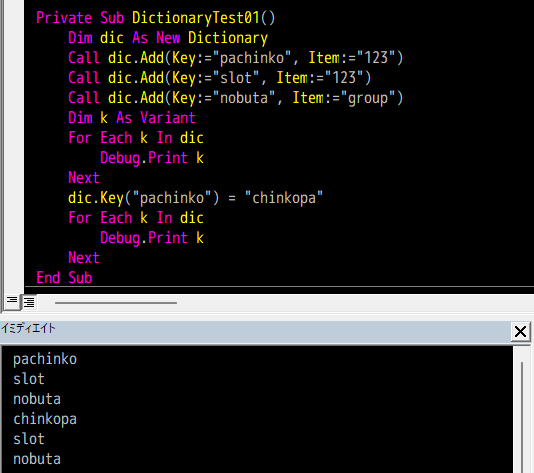
バッチリです。
おわりに
オブジェクトをキーにしたときにはまともに動かないし、Cstr()で文字列化できないキーもダメ、"123"と123のようにCStr()の結果が同じになるキーを使うと死ぬ、というポンコツなオブジェクトですが、そのあたりは追々ガードを追加していくということでご容赦ください。
カスタムDictionaryクラスのソースコード
ソースコードを
Option Explicit

Public Enum CompareMethod
    BinaryCompare = 0
    TextCompare = 1
    DatabaseCompare = 2
End Enum

Private m_Dictionary As Object
Private m_KeyCollection As Collection

Private Sub Class_Initialize()
    Set m_Dictionary = CreateObject("Scripting.Dictionary")
    Set m_KeyCollection = New Collection
End Sub

Public Property Get CompareMode() As CompareMethod
    CompareMode = m_Dictionary.CompareMode
End Property

Public Property Let CompareMode(ByVal CompareMode As CompareMethod)
    Const ERR_SOURCE As String = "`CompareMode` property(Let)"
    ' 本家Dictionaryは、要素追加後にCompareModeを設定しようとするとエラーになる
    '   -> ちょっと親切なエラーを吐く
    If m_Dictionary.Count > 0 Then _
        Call RaiseError(ERR_SOURCE, "要素追加後にCompareModeの変更はできない。")

    ' そもそもわけのわからない値を渡すことは許さん!
    If CompareMode < 0 Or CompareMode > 2 Then _
        Call RaiseError(ERR_SOURCE, "CompareMethod列挙体以外の値を渡してはいけない。")

    ' Access以外でDatabaseCompareを設定することは許さん!
    If (Application.Name = "Microsoft Access") Then GoTo Finally
    If CompareMode = DatabaseCompare Then _
        Call RaiseError(ERR_SOURCE, "Access以外でDatabaseCompareを使ってはいけない。")

Finally:
    m_Dictionary.CompareMode = CompareMode
End Property

Public Property Get Count() As Long
    Count = m_Dictionary.Count
End Property

Public Property Get Item(ByVal Key As Variant) As Variant
    If IsObject(m_Dictionary.Item(Key:=Key)) Then
        Set Item = m_Dictionary.Item(Key:=Key)
    Else
        Item = m_Dictionary.Item(Key:=Key)
    End If
End Property

Public Property Let Item( _
            ByVal Key As Variant, _
            ByVal Item As Variant)
    Const ERR_SOURCE As String = "Item property(Let)"
    ' オブジェクトが渡された
    If IsObject(Item) Then _
        Call RaiseError( _
            a_Source:=ERR_SOURCE, _
            a_Description:="オブジェクトを渡すときは`Set`を使わなければいけない。")

    ' 既存のキーでない -> キーのコレクションに追加
    If Not m_Dictionary.Exists(Key:=Key) Then _
        Call m_KeyCollection.Add(Item:=Key, Key:=CStr(Key))

    m_Dictionary.Item(Key:=Key) = Item
End Property

Public Property Set Item( _
            ByVal Key As Variant, _
            ByVal Item As Variant)
    Const ERR_SOURCE As String = "Item property(Set)"

    ' 既存のキーでない -> キーのコレクションに追加
    If Not m_Dictionary.Exists(Key:=Key) Then _
        Call m_KeyCollection.Add(Item:=Key, Key:=CStr(Key))

    Set m_Dictionary.Item(Key:=Key) = Item
End Property

Public Property Let Key( _
            ByVal Key As Variant, _
            ByVal NewKey As Variant)
    Const ERR_SOURCE As String = "Key property(Let)"

    If Not m_Dictionary.Exists(Key:=Key) Then _
        Call RaiseError(ERR_SOURCE, "存在しないキーを指定してはいけない。")

    If m_Dictionary.Exists(Key:=NewKey) Then _
        Call RaiseError(ERR_SOURCE, "既存のキーに変更することはできない。")

    ' まず内部Dictionaryを更新
    m_Dictionary.Key(Key:=Key) = NewKey

    ' キーCollectionを詰め込み直すしかない……。
    Set m_KeyCollection = New Collection
    Dim k As Variant
    For Each k In m_Dictionary.Keys()
        Call m_KeyCollection.Add(Item:=k, Key:=CStr(k))
    Next
End Property

Public Sub Add( _
            ByVal Key As Variant, _
            ByVal Item As Variant)
    Const ERR_SOURCE As String = "Add() method(Sub)"

    ' 既存のキーにアイテムを設定しようとした
    If m_Dictionary.Exists(Key) Then
        Call RaiseError( _
            a_Source:=ERR_SOURCE, _
            a_Description:="既存のキーにはアイテムを設定できない。")
    End If

    Call m_KeyCollection.Add(Item:=Key, Key:=CStr(Key))

    Call m_Dictionary.Add(Key:=Key, Item:=Item)
End Sub

Public Function Exists(ByVal Key As Variant) As Boolean
    Exists = m_Dictionary.Exists(Key)
End Function

Public Function Keys() As Variant
    Keys = m_Dictionary.Keys
End Function

Public Function Items() As Variant
    Items = m_Dictionary.Items
End Function

Public Sub Remove(ByVal Key As Variant)
    Const ERR_SOURCE As String = "Remove() method"
    If Not m_Dictionary.Exists(Key:=Key) Then _
        Call RaiseError(ERR_SOURCE, "存在しないキーを指定してはいけない。")

    Call m_KeyCollection.Remove(Index:=CStr(Key))
    Call m_Dictionary.Remove(Key:=Key)
End Sub

Public Sub RemoveAll()
    Call m_Dictionary.RemoveAll
    Set m_KeyCollection = New Collection
End Sub

Public Function NewEnum() As IUnknown
    Set NewEnum = m_KeyCollection.[_NewEnum]
End Function

Private Sub RaiseError( _
            ByVal a_Source As String, _
            ByVal a_Description As String)
        ' エラーオブジェクトに渡すパラメータを用意
    Dim errNum As Long, errDesc As String, errSrc As String
    errNum = vbObjectError + 1
    errSrc = "Dictionary class: " & a_Source
    errDesc = "( ´,_ゝ`) < プークスクスw " & a_Description & "(クソが。)"

    ' 例外スロー
    Call Err.Raise( _
        Number:=errNum, _
        Source:=errSrc, _
        Description:=errDesc)
End SubカスタムDictionaryクラスを作ろう(12)
カスタムDictionaryクラスを作ろう(12)
最後の仕上げです。
過去記事
現時点のソースコードです。
現時点のDictionaryモジュール
ソースコードを
Option Explicit

Public Enum CompareMethod
    BinaryCompare = 0
    TextCompare = 1
    DatabaseCompare = 2
End Enum

Private m_Dictionary As Object

Private Sub Class_Initialize()
    Set m_Dictionary = CreateObject("Scripting.Dictionary")
End Sub

Public Property Get CompareMode() As CompareMethod
    CompareMode = m_Dictionary.CompareMode
End Property

Public Property Let CompareMode(ByVal CompareMode As CompareMethod)
    Const ERR_SOURCE As String = "`CompareMode` property(Let)"
    ' 本家Dictionaryは、要素追加後にCompareModeを設定しようとするとエラーになる
    '   -> ちょっと親切なエラーを吐く
    If m_Dictionary.Count > 0 Then
        Call RaiseError( _
            a_Source:=ERR_SOURCE, _
            a_Description:="要素追加後にCompareModeの変更はできない。")
    End If
    m_Dictionary.CompareMode = CompareMode
End Property

Public Property Get Count() As Long
    Count = m_Dictionary.Count
End Property

Public Property Get Item(ByVal Key As Variant) As Variant
    If IsObject(m_Dictionary.Item(Key:=Key)) Then
        Set Item = m_Dictionary.Item(Key:=Key)
    Else
        Item = m_Dictionary.Item(Key:=Key)
    End If
End Property

Public Property Let Item( _
            ByVal Key As Variant, _
            ByVal Item As Variant)
    Const ERR_SOURCE As String = "Item property(Let)"
    ' オブジェクトが渡された
    If IsObject(Item) Then _
        Call RaiseError( _
            a_Source:=ERR_SOURCE, _
            a_Description:="オブジェクトを渡すときは`Set`を使わなければいけない。")

    m_Dictionary.Item(Key:=Key) = Item
End Property

Public Property Set Item( _
            ByVal Key As Variant, _
            ByVal Item As Variant)
    Const ERR_SOURCE As String = "Item property(Set)"

    Set m_Dictionary.Item(Key:=Key) = Item
End Property

Public Property Let Key( _
            ByVal Key As Variant, _
            ByVal NewKey As Variant)
    Const ERR_SOURCE As String = "Key property(Let)"

    If Not m_Dictionary.Exists(Key:=Key) Then _
        Call RaiseError(ERR_SOURCE, "存在しないキーを指定してはいけない。")

    If m_Dictionary.Exists(Key:=NewKey) Then _
        Call RaiseError(ERR_SOURCE, "既存のキーに変更することはできない。")

    m_Dictionary.Key(Key:=Key) = NewKey
End Property

Public Sub Add( _
            ByVal Key As Variant, _
            ByVal Item As Variant)
    Const ERR_SOURCE As String = "Add() method(Sub)"

    ' 既存のキーにアイテムを設定しようとした
    If m_Dictionary.Exists(Key) Then
        Call RaiseError( _
            a_Source:=ERR_SOURCE, _
            a_Description:="既存のキーにはアイテムを設定できない。")
    End If

    Call m_Dictionary.Add( _
        Key:=Key, _
        Item:=Item)
End Sub

Public Function Exists(ByVal Key As Variant) As Boolean
    Exists = m_Dictionary.Exists(Key)
End Function

Public Function Keys() As Variant
    Keys = m_Dictionary.Keys
End Function

Public Function Items() As Variant
    Items = m_Dictionary.Items
End Function

Public Sub Remove(ByVal Key As Variant)
    Const ERR_SOURCE As String = "Remove() method"
    If Not m_Dictionary.Exists(Key:=Key) Then _
        Call RaiseError(ERR_SOURCE, "存在しないキーを指定してはいけない。")

    Call m_Dictionary.Remove(Key:=Key)
End Sub

Public Sub RemoveAll()
    Call m_Dictionary.RemoveAll
End Sub

Private Sub RaiseError( _
            ByVal a_Source As String, _
            ByVal a_Description As String)
        ' エラーオブジェクトに渡すパラメータを用意
    Dim errNum As Long, errDesc As String, errSrc As String
    errNum = vbObjectError + 1
    errSrc = "Dictionary class: " & a_Source
    errDesc = "( ´,_ゝ`) < プークスクスw " & a_Description & "(クソが。)"

    ' 例外スロー
    Call Err.Raise( _
        Number:=errNum, _
        Source:=errSrc, _
        Description:=errDesc)
End Sub
CompareModeプロパティの改善
CompareModeプロパティのDatabaseCompare
CompareModeプロパティの設定値はCompareMethod列挙体で指定しますが、その中のDatabaseCompareという設定値は、Microsoft Accessでしか意味を持ちません。
[『Microsoft Learn』の「Learn」 > 「VBA」 > 「CompareMode Property」の項]にも、
Microsoft Access only. Performs a comparison based on information in your database.
このように書いてあります。
……というわけで、Access以外のVBA環境で、CompareModeプロパティにDatabaseCompareが渡されたときのガードを追加しておきましょう。
ガードを実装する
「ガード」といっても、〝勝手にデフォルト値にフォールバックさせる〟というような対応では、わけもわからずにCompareModeプロパティにDatabaseCompareを設定してしまうような愚かなユーザに反省を促すことができません。
そこで、愚かなユーザに反省を促すために、親切な例外を吐くようにします。
ホストアプリケーション名を確認するには、ApplicationオブジェクトのNameプロパティを参照すれば良いので、次のように実装すれば良いでしょう。
リスト1
Public Property Let CompareMode(ByVal CompareMode As CompareMethod)
    Const ERR_SOURCE As String = "`CompareMode` property(Let)"
    ' 本家Dictionaryは、要素追加後にCompareModeを設定しようとするとエラーになる
    '   -> ちょっと親切なエラーを吐く
    If m_Dictionary.Count > 0 Then _
        Call RaiseError(ERR_SOURCE, "要素追加後にCompareModeの変更はできない。")

    ' そもそもわけのわからない値を渡すことは許さん!
    If CompareMode < 0 Or CompareMode > 2 Then _
        Call RaiseError(ERR_SOURCE, "CompareMethod列挙体以外の値を渡してはいけない。")

    ' Access以外でDatabaseCompareを設定することは許さん!
    If (Application.Name = "Microsoft Access") Then GoTo Finally
    If CompareMode = DatabaseCompare Then _
        Call RaiseError(ERR_SOURCE, "Access以外でDatabaseCompareを使ってはいけない。")

Finally:
    m_Dictionary.CompareMode = CompareMode
End PropertyCompareModeプロパティに値を設定するときの話なので、Property Letプロシージャに追加します。
そもそも、VBAのホストアプリケーションがMicrosoft Accessだったら何の問題もないので、
If (Application.Name = "Microsoft Access") Then GoTo FinallyFinallyラベルまで飛ばしてしまいます。
そうすると、
If CompareMode = DatabaseCompare Then _
    Call RaiseError(ERR_SOURCE, "Access以外でDatabaseCompareを使ってはいけない。")
ここにたどり着くのはホストアプリケーションがMicrosoft Accessのときだけなので、シンプルに引数CompareModeの値をチェックするだけで済みます。
無用なIfのネスト防止につながるので、私はこの書き方を好みます。
あと、ついでに引数CompareModeに渡された値のチェックも追加しました。
If CompareMode < 0 Or CompareMode > 2 Then _
Call RaiseError(ERR_SOURCE, "CompareMethod列挙体以外の値を渡してはいけない。")引数の型をCompareMethodにしてあるので、入力中に

このようにヒントは出ますが、別にヒントを無視して-5とか114514のようなわけのわからない値を指定することもできてしまいます。
そして、わけのわからない値を設定してしまうと、

このように、何をどう反省したら良いのかよくわからないエラーメッセージが吐き出されます。
CompareMethod列挙体の実体は、0、1、2だけなので、
If CompareMode < 0 Or CompareMode > 2 Thenこの条件に引っかかったときに例外をスローするようにしています。
動作確認
リスト1-1
Private Sub DictionaryTest01()
    Dim dic As Dictionary
    Set dic = New Dictionary
    dic.CompareMode = DatabaseCompare
End Sub
これを実行すると、

「Access以外でDatabaseCompareを設定することは許さん!」
というオブジェクト設計者の意図がよく伝わります。
リスト1-2
Private Sub DictionaryTest02()
    Dim dic As Dictionary
    Set dic = New Dictionary
    dic.CompareMode = 114514
End Sub
これを実行すると、
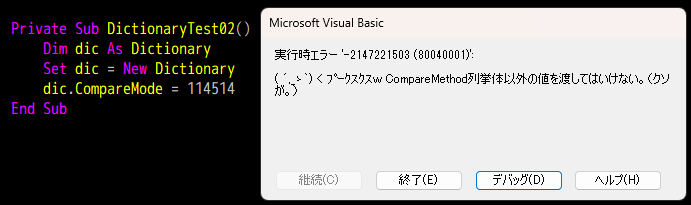
これまた、「CompareModeプロパティにCompareMethod以外のわけのわからない値を渡すことは許さん!」
という設計者の意図が良く伝わりますね。
おわりに
「カスタムDictionaryクラスを作ろう」シリーズは、これでいったんおしまい。
たとえば、Dictionaryインスタンスを
{"pachinko": 123, "slot": "123", "nobuta": "group"}のようにシリアル化するToString()メソッドとか、中身が同じかどうかを判定するEquals()メソッドなんかを追加で実装してみたら、非常に使い勝手の良いデータオブジェクトになるのではないでしょうか。
追記
まあまあ大規模な見落としがあったので、まだまだ続きます。
カスタムDictionaryクラスのソースコード
ソースコードを
Option Explicit

Public Enum CompareMethod
    BinaryCompare = 0
    TextCompare = 1
    DatabaseCompare = 2
End Enum

Private m_Dictionary As Object

Private Sub Class_Initialize()
    Set m_Dictionary = CreateObject("Scripting.Dictionary")
End Sub

Public Property Get CompareMode() As CompareMethod
    CompareMode = m_Dictionary.CompareMode
End Property

Public Property Let CompareMode(ByVal CompareMode As CompareMethod)
    Const ERR_SOURCE As String = "`CompareMode` property(Let)"
    ' 本家Dictionaryは、要素追加後にCompareModeを設定しようとするとエラーになる
    '   -> ちょっと親切なエラーを吐く
    If m_Dictionary.Count > 0 Then _
        Call RaiseError(ERR_SOURCE, "要素追加後にCompareModeの変更はできない。")

    ' そもそもわけのわからない値を渡すことは許さん!
    If CompareMode < 0 Or CompareMode > 2 Then _
        Call RaiseError(ERR_SOURCE, "CompareMethod列挙体以外の値を渡してはいけない。")

    ' Access以外でDatabaseCompareを設定することは許さん!
    If (Application.Name = "Microsoft Access") Then GoTo Finally
    If CompareMode = DatabaseCompare Then _
        Call RaiseError(ERR_SOURCE, "Access以外でDatabaseCompareを使ってはいけない。")

Finally:
    m_Dictionary.CompareMode = CompareMode
End Property

Public Property Get Count() As Long
    Count = m_Dictionary.Count
End Property

Public Property Get Item(ByVal Key As Variant) As Variant
    If IsObject(m_Dictionary.Item(Key:=Key)) Then
        Set Item = m_Dictionary.Item(Key:=Key)
    Else
        Item = m_Dictionary.Item(Key:=Key)
    End If
End Property

Public Property Let Item( _
            ByVal Key As Variant, _
            ByVal Item As Variant)
    Const ERR_SOURCE As String = "Item property(Let)"
    ' オブジェクトが渡された
    If IsObject(Item) Then _
        Call RaiseError( _
            a_Source:=ERR_SOURCE, _
            a_Description:="オブジェクトを渡すときは`Set`を使わなければいけない。")

    m_Dictionary.Item(Key:=Key) = Item
End Property

Public Property Set Item( _
            ByVal Key As Variant, _
            ByVal Item As Variant)
    Const ERR_SOURCE As String = "Item property(Set)"

    Set m_Dictionary.Item(Key:=Key) = Item
End Property

Public Property Let Key( _
            ByVal Key As Variant, _
            ByVal NewKey As Variant)
    Const ERR_SOURCE As String = "Key property(Let)"

    If Not m_Dictionary.Exists(Key:=Key) Then _
        Call RaiseError(ERR_SOURCE, "存在しないキーを指定してはいけない。")

    If m_Dictionary.Exists(Key:=NewKey) Then _
        Call RaiseError(ERR_SOURCE, "既存のキーに変更することはできない。")

    m_Dictionary.Key(Key:=Key) = NewKey
End Property

Public Sub Add( _
            ByVal Key As Variant, _
            ByVal Item As Variant)
    Const ERR_SOURCE As String = "Add() method(Sub)"

    ' 既存のキーにアイテムを設定しようとした
    If m_Dictionary.Exists(Key) Then
        Call RaiseError( _
            a_Source:=ERR_SOURCE, _
            a_Description:="既存のキーにはアイテムを設定できない。")
    End If

    Call m_Dictionary.Add( _
        Key:=Key, _
        Item:=Item)
End Sub

Public Function Exists(ByVal Key As Variant) As Boolean
    Exists = m_Dictionary.Exists(Key)
End Function

Public Function Keys() As Variant
    Keys = m_Dictionary.Keys
End Function

Public Function Items() As Variant
    Items = m_Dictionary.Items
End Function

Public Sub Remove(ByVal Key As Variant)
    Const ERR_SOURCE As String = "Remove() method"
    If Not m_Dictionary.Exists(Key:=Key) Then _
        Call RaiseError(ERR_SOURCE, "存在しないキーを指定してはいけない。")

    Call m_Dictionary.Remove(Key:=Key)
End Sub

Public Sub RemoveAll()
    Call m_Dictionary.RemoveAll
End Sub

Private Sub RaiseError( _
            ByVal a_Source As String, _
            ByVal a_Description As String)
        ' エラーオブジェクトに渡すパラメータを用意
    Dim errNum As Long, errDesc As String, errSrc As String
    errNum = vbObjectError + 1
    errSrc = "Dictionary class: " & a_Source
    errDesc = "( ´,_ゝ`) < プークスクスw " & a_Description & "(クソが。)"

    ' 例外スロー
    Call Err.Raise( _
        Number:=errNum, _
        Source:=errSrc, _
        Description:=errDesc)
End SubカスタムDictionaryクラスを作ろう(11)
カスタムDictionaryクラスを作ろう(11)
前回の続きです。
過去記事
現時点のソースコードです。
現時点のDictionaryモジュール
ソースコードを
Option Explicit

Public Enum CompareMethod
    BinaryCompare = 0
    TextCompare = 1
    DatabaseCompare = 2
End Enum

Private m_Dictionary As Object

Private Sub Class_Initialize()
    Set m_Dictionary = CreateObject("Scripting.Dictionary")
End Sub

Public Property Get CompareMode() As CompareMethod
    CompareMode = m_Dictionary.CompareMode
End Property

Public Property Let CompareMode(ByVal CompareMode As CompareMethod)
    Const ERR_SOURCE As String = "`CompareMode` property(Let)"
    ' 本家Dictionaryは、要素追加後にCompareModeを設定しようとするとエラーになる
    '   -> ちょっと親切なエラーを吐く
    If m_Dictionary.Count > 0 Then
        Call RaiseError( _
            a_Source:=ERR_SOURCE, _
            a_Description:="要素追加後にCompareModeの変更はできない。")
    End If
    m_Dictionary.CompareMode = CompareMode
End Property

Public Property Get Count() As Long
    Count = m_Dictionary.Count
End Property

Public Property Get Item(ByVal Key As Variant) As Variant
    If IsObject(m_Dictionary.Item(Key:=Key)) Then
        Set Item = m_Dictionary.Item(Key:=Key)
    Else
        Item = m_Dictionary.Item(Key:=Key)
    End If
End Property

Public Property Let Item( _
            ByVal Key As Variant, _
            ByVal Item As Variant)
    Const ERR_SOURCE As String = "Item property(Let)"
    ' オブジェクトが渡された
    If IsObject(Item) Then _
        Call RaiseError( _
            a_Source:=ERR_SOURCE, _
            a_Description:="オブジェクトを渡すときは`Set`を使わなければいけない。")

    m_Dictionary.Item(Key:=Key) = Item
End Property

Public Property Set Item( _
            ByVal Key As Variant, _
            ByVal Item As Variant)
    Const ERR_SOURCE As String = "Item property(Set)"

    Set m_Dictionary.Item(Key:=Key) = Item
End Property

Public Property Let Key( _
            ByVal Key As Variant, _
            ByVal NewKey As Variant)
    Const ERR_SOURCE As String = "Key property(Let)"

    If Not m_Dictionary.Exists(Key:=Key) Then _
        Call RaiseError(ERR_SOURCE, "存在しないキーを指定してはいけない。")

    If m_Dictionary.Exists(Key:=NewKey) Then _
        Call RaiseError(ERR_SOURCE, "既存のキーに変更することはできない。")

    m_Dictionary.Key(Key:=Key) = NewKey
End Property

Public Sub Add( _
            ByVal Key As Variant, _
            ByVal Item As Variant)
    Const ERR_SOURCE As String = "Add() method(Sub)"

    ' 既存のキーにアイテムを設定しようとした
    If m_Dictionary.Exists(Key) Then
        Call RaiseError( _
            a_Source:=ERR_SOURCE, _
            a_Description:="既存のキーにはアイテムを設定できない。")
    End If

    Call m_Dictionary.Add( _
        Key:=Key, _
        Item:=Item)
End Sub

Public Function Exists(ByVal Key As Variant) As Boolean
    Exists = m_Dictionary.Exists(Key)
End Function

Public Sub Remove(ByVal Key As Variant)
    Const ERR_SOURCE As String = "Remove() method"
    If Not m_Dictionary.Exists(Key:=Key) Then _
        Call RaiseError(ERR_SOURCE, "存在しないキーを指定してはいけない。")

    Call m_Dictionary.Remove(Key:=Key)
End Sub

Public Sub RemoveAll()
    Call m_Dictionary.RemoveAll
End Sub

Private Sub RaiseError( _
            ByVal a_Source As String, _
            ByVal a_Description As String)
        ' エラーオブジェクトに渡すパラメータを用意
    Dim errNum As Long, errDesc As String, errSrc As String
    errNum = vbObjectError + 1
    errSrc = "Dictionary class: " & a_Source
    errDesc = "( ´,_ゝ`) < プークスクスw " & a_Description & "(クソが。)"

    ' 例外スロー
    Call Err.Raise( _
        Number:=errNum, _
        Source:=errSrc, _
        Description:=errDesc)
End Sub
Keys()メソッドの実装
まずは、仕様の確認ですね。
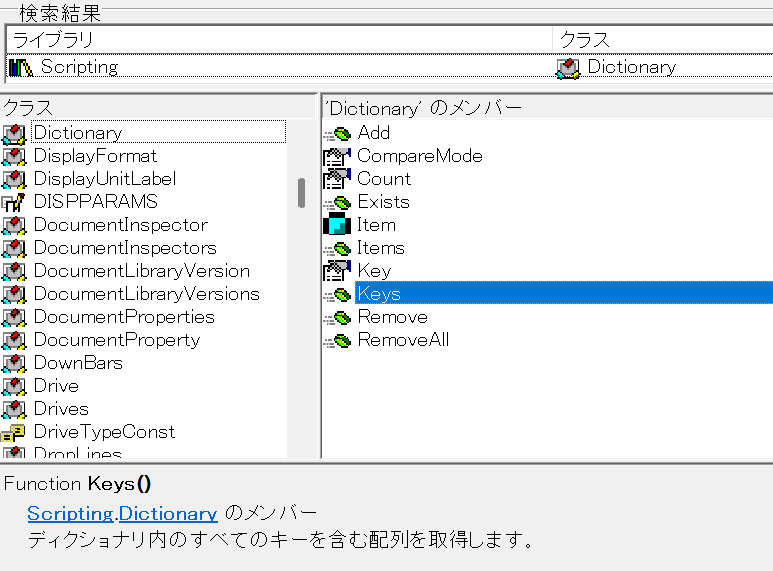
Function Keys()
Scripting.Dictionaryのメンバーディクショナリ内のすべてのキーを含む配列を取得します。
むむむ……。配列だったのか……。
てっきりCollectionだと思っておったわ……。
Keys()メソッドを実装する
とりあえず、オブジェクト ブラウザーの情報をもとに実装してみましょう。
リスト1
Public Function Keys() As Variant
    Keys = m_Dictionary.Keys
End Function
当然こうなります。
Keys()メソッドの動作確認
では、動作確認をしてみましょう。
DictionaryクラスのKeys()メソッドの何がうれしいかというと、
For Each ... Nextループで回せること
なわけです。
リスト1-1
Private Sub DictionaryTest01()
    Dim dic As Dictionary
    Set dic = New Dictionary
    Call dic.Add(Key:="pachinko", Item:=123)
    Call dic.Add(Key:="slot", Item:="123")
    Call dic.Add(Key:="nobuta", Item:="group")
    Dim k As Variant
    For Each k In dic.Keys()
        Debug.Print k
    Next
End Sub
こいつを実行してみると……。
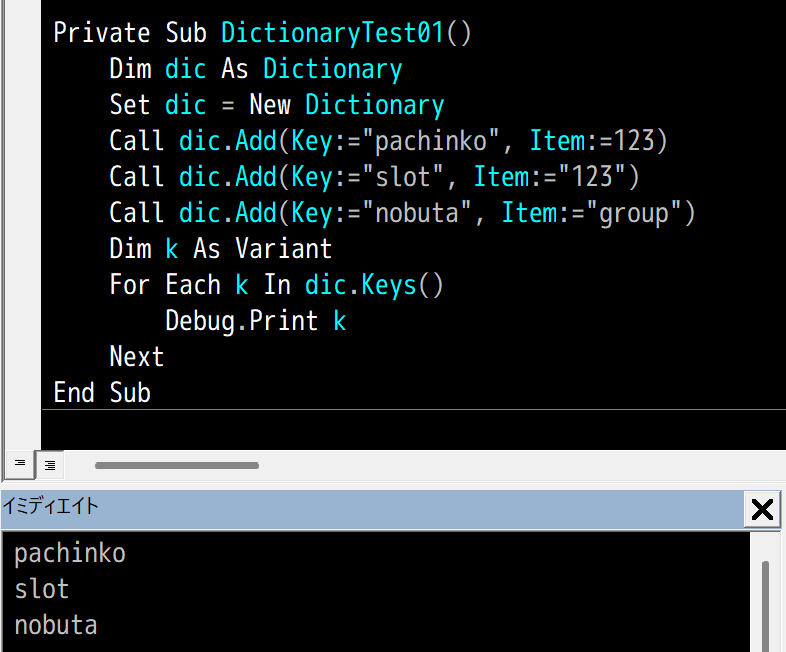
なんと、あっさり成功……。
まっ たく 簡 単 だ
……ということは、Items()メソッドも同じやり方でいけそうですね。
Items()メソッドの実装
例によって仕様の確認。
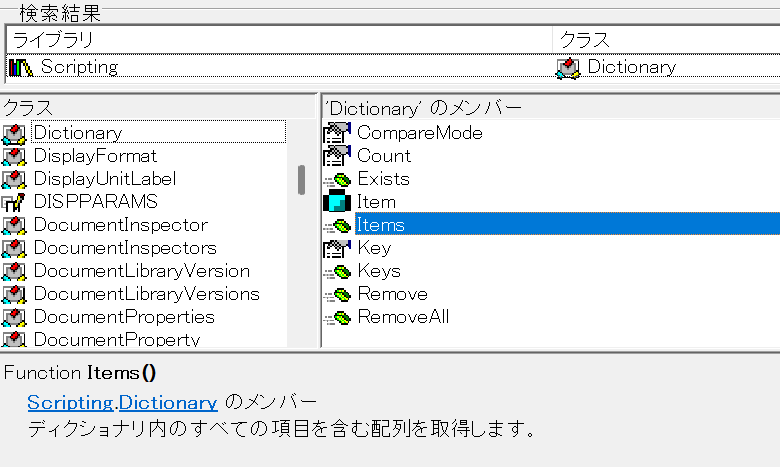
Function Items()
Scripting.Dictionaryのメンバーディクショナリ内のすべての項目を含む配列を取得します。
もうまったく同じやり方でいけそうですね。
リスト2
Public Function Items() As Variant
    Items = m_Dictionary.Items
End Function
もはや動作確認はめんどくさいから省略。
これで良いはずです。
おわりに
というわけで、カスタムDictionaryクラスはめでたく完成しました。
Keys()やItems()がVariant()を返すおかげで、NewEnum()とか実装しなくてもFor Each ... Nextによるイテレートができるなんて、ちょっと意外でした。
Variantってめちゃくちゃ便利だったんですね……。
あとは、次回、ちょっとした仕上げをしておくことにしましょう。
とりあえず完成したDictionaryモジュールのソースコード
ソースコードを
Option Explicit

Public Enum CompareMethod
    BinaryCompare = 0
    TextCompare = 1
    DatabaseCompare = 2
End Enum

Private m_Dictionary As Object

Private Sub Class_Initialize()
    Set m_Dictionary = CreateObject("Scripting.Dictionary")
End Sub

Public Property Get CompareMode() As CompareMethod
    CompareMode = m_Dictionary.CompareMode
End Property

Public Property Let CompareMode(ByVal CompareMode As CompareMethod)
    Const ERR_SOURCE As String = "`CompareMode` property(Let)"
    ' 本家Dictionaryは、要素追加後にCompareModeを設定しようとするとエラーになる
    '   -> ちょっと親切なエラーを吐く
    If m_Dictionary.Count > 0 Then
        Call RaiseError( _
            a_Source:=ERR_SOURCE, _
            a_Description:="要素追加後にCompareModeの変更はできない。")
    End If
    m_Dictionary.CompareMode = CompareMode
End Property

Public Property Get Count() As Long
    Count = m_Dictionary.Count
End Property

Public Property Get Item(ByVal Key As Variant) As Variant
    If IsObject(m_Dictionary.Item(Key:=Key)) Then
        Set Item = m_Dictionary.Item(Key:=Key)
    Else
        Item = m_Dictionary.Item(Key:=Key)
    End If
End Property

Public Property Let Item( _
            ByVal Key As Variant, _
            ByVal Item As Variant)
    Const ERR_SOURCE As String = "Item property(Let)"
    ' オブジェクトが渡された
    If IsObject(Item) Then _
        Call RaiseError( _
            a_Source:=ERR_SOURCE, _
            a_Description:="オブジェクトを渡すときは`Set`を使わなければいけない。")

    m_Dictionary.Item(Key:=Key) = Item
End Property

Public Property Set Item( _
            ByVal Key As Variant, _
            ByVal Item As Variant)
    Const ERR_SOURCE As String = "Item property(Set)"

    Set m_Dictionary.Item(Key:=Key) = Item
End Property

Public Property Let Key( _
            ByVal Key As Variant, _
            ByVal NewKey As Variant)
    Const ERR_SOURCE As String = "Key property(Let)"

    If Not m_Dictionary.Exists(Key:=Key) Then _
        Call RaiseError(ERR_SOURCE, "存在しないキーを指定してはいけない。")

    If m_Dictionary.Exists(Key:=NewKey) Then _
        Call RaiseError(ERR_SOURCE, "既存のキーに変更することはできない。")

    m_Dictionary.Key(Key:=Key) = NewKey
End Property

Public Sub Add( _
            ByVal Key As Variant, _
            ByVal Item As Variant)
    Const ERR_SOURCE As String = "Add() method(Sub)"

    ' 既存のキーにアイテムを設定しようとした
    If m_Dictionary.Exists(Key) Then
        Call RaiseError( _
            a_Source:=ERR_SOURCE, _
            a_Description:="既存のキーにはアイテムを設定できない。")
    End If

    Call m_Dictionary.Add( _
        Key:=Key, _
        Item:=Item)
End Sub

Public Function Exists(ByVal Key As Variant) As Boolean
    Exists = m_Dictionary.Exists(Key)
End Function

Public Function Keys() As Variant
    Keys = m_Dictionary.Keys
End Function

Public Function Items() As Variant
    Items = m_Dictionary.Items
End Function

Public Sub Remove(ByVal Key As Variant)
    Const ERR_SOURCE As String = "Remove() method"
    If Not m_Dictionary.Exists(Key:=Key) Then _
        Call RaiseError(ERR_SOURCE, "存在しないキーを指定してはいけない。")

    Call m_Dictionary.Remove(Key:=Key)
End Sub

Public Sub RemoveAll()
    Call m_Dictionary.RemoveAll
End Sub

Private Sub RaiseError( _
            ByVal a_Source As String, _
            ByVal a_Description As String)
        ' エラーオブジェクトに渡すパラメータを用意
    Dim errNum As Long, errDesc As String, errSrc As String
    errNum = vbObjectError + 1
    errSrc = "Dictionary class: " & a_Source
    errDesc = "( ´,_ゝ`) < プークスクスw " & a_Description & "(クソが。)"

    ' 例外スロー
    Call Err.Raise( _
        Number:=errNum, _
        Source:=errSrc, _
        Description:=errDesc)
End SubカスタムDictionaryクラスを作ろう(10)
カスタムDictionaryクラスを作ろう(10)
前回の続きです。
過去記事
現時点のソースコードです。
現時点のDictionaryモジュール
ソースコードを
Option Explicit

Public Enum CompareMethod
    BinaryCompare = 0
    TextCompare = 1
    DatabaseCompare = 2
End Enum

Private m_Dictionary As Object

Private Sub Class_Initialize()
    Set m_Dictionary = CreateObject("Scripting.Dictionary")
End Sub

Public Property Get CompareMode() As CompareMethod
    CompareMode = m_Dictionary.CompareMode
End Property

Public Property Let CompareMode(ByVal CompareMode As CompareMethod)
    Const ERR_SOURCE As String = "`CompareMode` property(Let)"
    ' 本家Dictionaryは、要素追加後にCompareModeを設定しようとするとエラーになる
    '   -> ちょっと親切なエラーを吐く
    If m_Dictionary.Count > 0 Then
        Call RaiseError( _
            a_Source:=ERR_SOURCE, _
            a_Description:="要素追加後にCompareModeの変更はできない。")
    End If
    m_Dictionary.CompareMode = CompareMode
End Property

Public Property Get Count() As Long
    Count = m_Dictionary.Count
End Property

Public Property Get Item(ByVal Key As Variant) As Variant
    If IsObject(m_Dictionary.Item(Key:=Key)) Then
        Set Item = m_Dictionary.Item(Key:=Key)
    Else
        Item = m_Dictionary.Item(Key:=Key)
    End If
End Property

Public Property Let Item( _
            ByVal Key As Variant, _
            ByVal Item As Variant)
    Const ERR_SOURCE As String = "Item property(Let)"
    ' オブジェクトが渡された
    If IsObject(Item) Then _
        Call RaiseError( _
            a_Source:=ERR_SOURCE, _
            a_Description:="オブジェクトを渡すときは`Set`を使わなければいけない。")

    m_Dictionary.Item(Key:=Key) = Item
End Property

Public Property Set Item( _
            ByVal Key As Variant, _
            ByVal Item As Variant)
    Const ERR_SOURCE As String = "Item property(Set)"

    Set m_Dictionary.Item(Key:=Key) = Item
End Property

Public Property Let Key( _
            ByVal Key As Variant, _
            ByVal NewKey As Variant)
    Const ERR_SOURCE As String = "Key property(Let)"

    If Not m_Dictionary.Exists(Key:=Key) Then _
        Call RaiseError(ERR_SOURCE, "存在しないキーを指定してはいけない。")

    If m_Dictionary.Exists(Key:=NewKey) Then _
        Call RaiseError(ERR_SOURCE, "既存のキーに変更することはできない。")

    m_Dictionary.Key(Key:=Key) = NewKey
End Property

Public Sub Add( _
            ByVal Key As Variant, _
            ByVal Item As Variant)
    Const ERR_SOURCE As String = "Add() method(Sub)"

    ' 既存のキーにアイテムを設定しようとした
    If m_Dictionary.Exists(Key) Then
        Call RaiseError( _
            a_Source:=ERR_SOURCE, _
            a_Description:="既存のキーにはアイテムを設定できない。")
    End If

    Call m_Dictionary.Add( _
        Key:=Key, _
        Item:=Item)
End Sub

Public Function Exists(ByVal Key As Variant) As Boolean
    Exists = m_Dictionary.Exists(Key)
End Function

Public Sub Remove(ByVal Key As Variant)
    Const ERR_SOURCE As String = "Remove() method"
    If Not m_Dictionary.Exists(Key:=Key) Then _
        Call RaiseError(ERR_SOURCE, "存在しないキーを指定してはいけない。")

    Call m_Dictionary.Remove(Key:=Key)
End Sub

Private Sub RaiseError( _
            ByVal a_Source As String, _
            ByVal a_Description As String)
        ' エラーオブジェクトに渡すパラメータを用意
    Dim errNum As Long, errDesc As String, errSrc As String
    errNum = vbObjectError + 1
    errSrc = "Dictionary class: " & a_Source
    errDesc = "( ´,_ゝ`) < プークスクスw " & a_Description & "(クソが。)"

    ' 例外スロー
    Call Err.Raise( _
        Number:=errNum, _
        Source:=errSrc, _
        Description:=errDesc)
End Sub
RemoveAll()メソッドの実装
まずは、仕様の確認ですね。
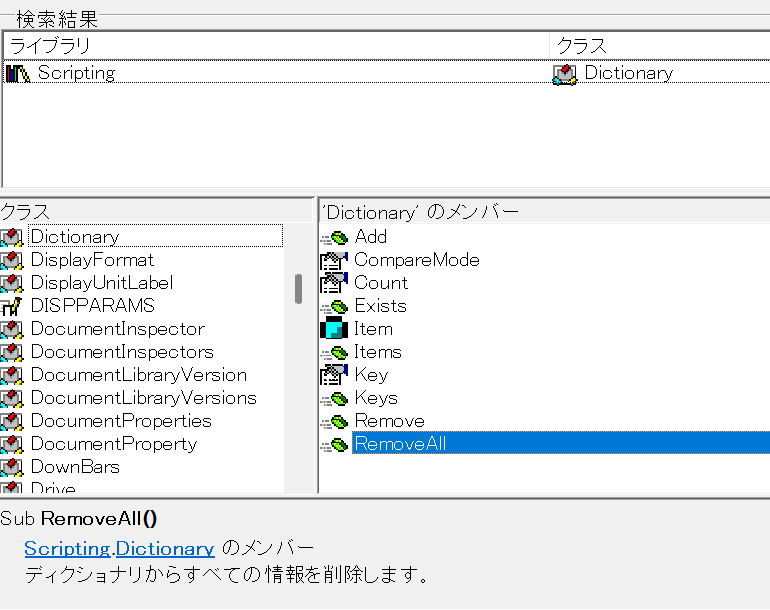
Sub RemoveAll()
Scripting.Dictionaryのメンバーディクショナリからすべての情報を削除します。
ただ全部削除するだけなので、実に簡単そうです。
唯一気になるのは、
要素がないときに実行したらどうなるか
という点ですが、実験してみたところ特に問題ないようです。
……というわけで、サクッと実装してしまいましょう。
RemoveAll()メソッドを実装する
リスト1
Public Sub RemoveAll()
    Call m_Dictionary.RemoveAll
End Sub
たったこれだけです。
動作確認
次のコードで動作確認しておきましょう。
リスト1-1
Private Sub DictionaryTest01()
    Dim dic As Dictionary
    Set dic = New Dictionary
    Call dic.Add(Key:="pachinko", Item:=123)
    Call dic.Add(Key:="slot", Item:="123")
    Call dic.Add(Key:="nobuta", Item:="group")
    Debug.Print dic.Count
    Call dic.RemoveAll
    Debug.Print dic.Count
End SubAdd()メソッドを3回実行した直後なので、7行目の
Debug.Print dic.Countでは3、RemoveAll()メソッド実行直後なので9行目の
Debug.Print dic.Countでは0が出力されるはずです。
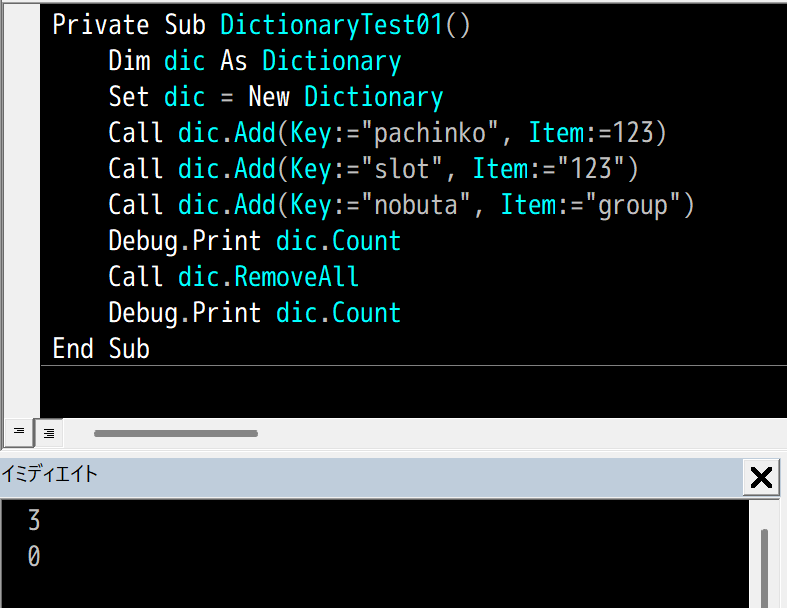
バッチリですね。
おわりに
いよいよ残りはKeys()、Items()メソッドですね。
今回終了時点でのDictionaryモジュールのソースコード
ソースコードを
Option Explicit

Public Enum CompareMethod
    BinaryCompare = 0
    TextCompare = 1
    DatabaseCompare = 2
End Enum

Private m_Dictionary As Object

Private Sub Class_Initialize()
    Set m_Dictionary = CreateObject("Scripting.Dictionary")
End Sub

Public Property Get CompareMode() As CompareMethod
    CompareMode = m_Dictionary.CompareMode
End Property

Public Property Let CompareMode(ByVal CompareMode As CompareMethod)
    Const ERR_SOURCE As String = "`CompareMode` property(Let)"
    ' 本家Dictionaryは、要素追加後にCompareModeを設定しようとするとエラーになる
    '   -> ちょっと親切なエラーを吐く
    If m_Dictionary.Count > 0 Then
        Call RaiseError( _
            a_Source:=ERR_SOURCE, _
            a_Description:="要素追加後にCompareModeの変更はできない。")
    End If
    m_Dictionary.CompareMode = CompareMode
End Property

Public Property Get Count() As Long
    Count = m_Dictionary.Count
End Property

Public Property Get Item(ByVal Key As Variant) As Variant
    If IsObject(m_Dictionary.Item(Key:=Key)) Then
        Set Item = m_Dictionary.Item(Key:=Key)
    Else
        Item = m_Dictionary.Item(Key:=Key)
    End If
End Property

Public Property Let Item( _
            ByVal Key As Variant, _
            ByVal Item As Variant)
    Const ERR_SOURCE As String = "Item property(Let)"
    ' オブジェクトが渡された
    If IsObject(Item) Then _
        Call RaiseError( _
            a_Source:=ERR_SOURCE, _
            a_Description:="オブジェクトを渡すときは`Set`を使わなければいけない。")

    m_Dictionary.Item(Key:=Key) = Item
End Property

Public Property Set Item( _
            ByVal Key As Variant, _
            ByVal Item As Variant)
    Const ERR_SOURCE As String = "Item property(Set)"

    Set m_Dictionary.Item(Key:=Key) = Item
End Property

Public Property Let Key( _
            ByVal Key As Variant, _
            ByVal NewKey As Variant)
    Const ERR_SOURCE As String = "Key property(Let)"

    If Not m_Dictionary.Exists(Key:=Key) Then _
        Call RaiseError(ERR_SOURCE, "存在しないキーを指定してはいけない。")

    If m_Dictionary.Exists(Key:=NewKey) Then _
        Call RaiseError(ERR_SOURCE, "既存のキーに変更することはできない。")

    m_Dictionary.Key(Key:=Key) = NewKey
End Property

Public Sub Add( _
            ByVal Key As Variant, _
            ByVal Item As Variant)
    Const ERR_SOURCE As String = "Add() method(Sub)"

    ' 既存のキーにアイテムを設定しようとした
    If m_Dictionary.Exists(Key) Then
        Call RaiseError( _
            a_Source:=ERR_SOURCE, _
            a_Description:="既存のキーにはアイテムを設定できない。")
    End If

    Call m_Dictionary.Add( _
        Key:=Key, _
        Item:=Item)
End Sub

Public Function Exists(ByVal Key As Variant) As Boolean
    Exists = m_Dictionary.Exists(Key)
End Function

Public Sub Remove(ByVal Key As Variant)
    Const ERR_SOURCE As String = "Remove() method"
    If Not m_Dictionary.Exists(Key:=Key) Then _
        Call RaiseError(ERR_SOURCE, "存在しないキーを指定してはいけない。")

    Call m_Dictionary.Remove(Key:=Key)
End Sub

Public Sub RemoveAll()
    Call m_Dictionary.RemoveAll
End Sub

Private Sub RaiseError( _
            ByVal a_Source As String, _
            ByVal a_Description As String)
        ' エラーオブジェクトに渡すパラメータを用意
    Dim errNum As Long, errDesc As String, errSrc As String
    errNum = vbObjectError + 1
    errSrc = "Dictionary class: " & a_Source
    errDesc = "( ´,_ゝ`) < プークスクスw " & a_Description & "(クソが。)"

    ' 例外スロー
    Call Err.Raise( _
        Number:=errNum, _
        Source:=errSrc, _
        Description:=errDesc)
End Sub