指定フォルダからファイル名を取り出すクラス
指定したフォルダからファイル名を取得するクラス
Twitterではけたさんがおっしゃっていたものを私も作ってみた。
あまりうまくないかも知れないけれど……。
指定フォルダからファイル名を取得するクラス
オブジェクト名は「TargetFiles」とした。
リスト1 クラスモジュール
Option Explicit

'Variables'
Private FoundFiles() As String
Private Count_ As Long
Private currentFolder As String
Private currentIndex As Long
Private HasNext_ As Boolean
'Properties'
Public Property Get Count() As Long
  Count = Count_
End Property
Public Property Get Item(ByVal i As Long) As String
  If i > Count Then Item = "": Exit Property
    If i < 1 Then
      currentIndex = 0
    Else
      currentIndex = i - 1
    End If
  Item = FoundFiles(currentIndex)
End Property
Public Property Get CurrentFile() As String
  If Count_ = 0 Then CurrentFile = "": Exit Property
  CurrentFile = FoundFiles(currentIndex)
  If currentIndex = Count_ - 1 Then
    HasNext_ = False
  Else
    HasNext_ = True
  End If
End Property
Public Property Get HasNext() As Boolean
  HasNext = HasNext_
End Property
Public Property Get NextFile() As String
  If HasNext_ Then
    NextFile = FoundFiles(currentIndex + 1)
    currentIndex = currentIndex + 1
  Else
    NextFile = ""
  End If
  If currentIndex = Count_ - 1 Then HasNext_ = False
End Property
Public Property Get PrevFile() As String
  If currentIndex > 0 Then
    PrevFile = FoundFiles(currentIndex - 1)
    currentIndex = currentIndex - 1
  Else
    PrevFile = ""
  End If
End Property
'Constructor'
Public Sub init(ByVal targetFolderName As String, _
                ByVal searchCondition As String)
  If Right(targetFolderName, 1) = "\" Then _
    targetFolderName = Left(targetFolderName, _
                            Len(targetFolderName) - 1)    '"
  currentFolder = targetFolderName & "\"              '"
  If Dir(currentFolder) = "" Then
    currentFolder = ThisWorkbook.Path & "\"     '"
    Exit Sub
  End If
  Call getFileNamesArray(currentFolder, searchCondition)
  currentIndex = 0
End Sub
'Methods'
Public Sub getFileNamesArray(ByVal targetFolder As String, _
                             ByVal searchCondition As String)
  Dim n As Long
  n = 0
  Dim foundFile As String
  foundFile = Dir(targetFolder & searchCondition, vbNormal)
  Do While foundFile <> ""
    ReDim Preserve FoundFiles(n)
    FoundFiles(n) = foundFile
    n = n + 1
    foundFile = Dir()
  Loop
  Count_ = n
End Sub
説明は、また時間があるときにゆっくり書く。
使ってみる
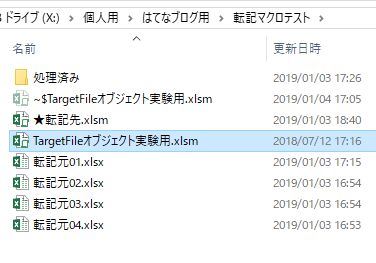
このようなフォルダを準備して、次のコードで実行。
リスト2 標準モジュール
Public Sub testTargetFilesClass()
  Dim TargetFiles As New TargetFiles
  With TargetFiles
    Call .init(ThisWorkbook.Path, "*.xls*")
    Debug.Print .CurrentFile
    Do
      Debug.Print .NextFile
    Loop Until Not .HasNext
  End With
End Sub
こいつを実行すると、
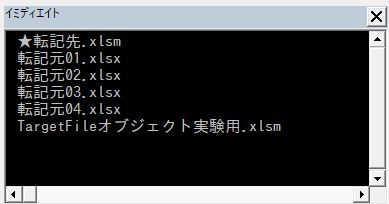
こうなる。
もう一つ、次のパターンも。
リスト3 標準モジュール
Public Sub testTargetFilesClass02()
  Dim TargetFiles As New TargetFiles
  With TargetFiles
    Call .init(ThisWorkbook.Path, "*.xls*")
    Dim i As Long
    For i = 1 To .Count
      Debug.Print .Item(i)
    Next
  End With
End Sub
こいつを実行すると、
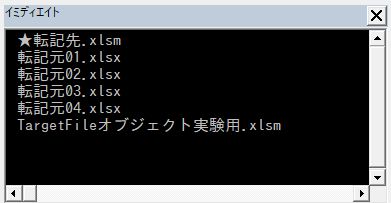
こうなる。
要するに、DoループにもForループにも対応可ということ。
おわりに
とりあえず書いてみただけなので、改良の余地はたくさんあると思います。
