カスタムDictionaryクラスを作ろう(8)
前回の続きです。
過去記事
現時点のソースコードです。
現時点のDictionaryモジュール
ソースコードを
Option Explicit

Public Enum CompareMethod
    BinaryCompare = 0
    TextCompare = 1
    DatabaseCompare = 2
End Enum

Private m_Dictionary As Object

Private Sub Class_Initialize()
    Set m_Dictionary = CreateObject("Scripting.Dictionary")
End Sub

Public Property Get CompareMode() As CompareMethod
    CompareMode = m_Dictionary.CompareMode
End Property

Public Property Let CompareMode(ByVal CompareMode As CompareMethod)
    Const ERR_SOURCE As String = "`CompareMode` property(Let)"
    ' 本家Dictionaryは、要素追加後にCompareModeを設定しようとするとエラーになる
    '   -> ちょっと親切なエラーを吐く
    If m_Dictionary.Count > 0 Then
        Call RaiseError( _
            a_Source:=ERR_SOURCE, _
            a_Description:="要素追加後にCompareModeの変更はできない。")
    End If
    m_Dictionary.CompareMode = CompareMode
End Property

Public Property Get Count() As Long
    Count = m_Dictionary.Count
End Property

Public Property Get Item(ByVal Key As Variant) As Variant
    If IsObject(m_Dictionary.Item(Key:=Key)) Then
        Set Item = m_Dictionary.Item(Key:=Key)
    Else
        Item = m_Dictionary.Item(Key:=Key)
    End If
End Property

Public Property Let Item( _
            ByVal Key As Variant, _
            ByVal Item As Variant)
    Const ERR_SOURCE As String = "Item property(Let)"
    ' オブジェクトが渡された
    If IsObject(Item) Then _
        Call RaiseError( _
            a_Source:=ERR_SOURCE, _
            a_Description:="オブジェクトを渡すときは`Set`を使わなければいけない。")

    m_Dictionary.Item(Key:=Key) = Item
End Property

Public Property Set Item( _
            ByVal Key As Variant, _
            ByVal Item As Variant)
    Const ERR_SOURCE As String = "Item property(Set)"

    Set m_Dictionary.Item(Key:=Key) = Item
End Property

Public Sub Add( _
            ByVal Key As Variant, _
            ByVal Item As Variant)
    Const ERR_SOURCE As String = "Add() method(Sub)"

    ' 既存のキーにアイテムを設定しようとした
    If m_Dictionary.Exists(Key) Then
        Call RaiseError( _
            a_Source:=ERR_SOURCE, _
            a_Description:="既存のキーにはアイテムを設定できない。")
    End If

    Call m_Dictionary.Add( _
        Key:=Key, _
        Item:=Item)
End Sub

Public Function Exists(ByVal Key As Variant) As Boolean
    Exists = m_Dictionary.Exists(Key)
End Function

Private Sub RaiseError( _
            ByVal a_Source As String, _
            ByVal a_Description As String)
        ' エラーオブジェクトに渡すパラメータを用意
    Dim errNum As Long, errDesc As String, errSrc As String
    errNum = vbObjectError + 1
    errSrc = "Dictionary class: " & a_Source
    errDesc = "( ´,_ゝ`) < プークスクスw " & a_Description & "(クソが。)"

    ' 例外スロー
    Call Err.Raise( _
        Number:=errNum, _
        Source:=errSrc, _
        Description:=errDesc)
End Sub
Keyプロパティの実装
最初に、仕様の確認。

Property Key(Key)
Scripting.Dictionaryのメンバーキーを別のキーに変更します。
このようになっています。
少し珍しいのは、このプロパティが〝Writeonly〟(書き込み専用)であること。〝Readonly〟(読み取り専用)というのはよく見かけますが、書き込み専用は珍しい気がします。

こんな使い方をするんですね。
WriteonlyのKeyプロパティを実装する
では、ここまでの情報をもとに実装してみましょう。
……と、ここで、手がぱたっと止まります。
第2引数の仮引数名ってどうしたらいいの……?
となってしまうのです。
実は、本家Dictionaryは、

第1引数の仮引数名はKeyです。
で、
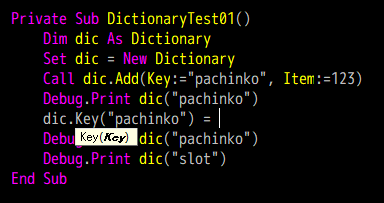
なんと、第2引数の仮引数名が表示されないのです。(カッコの中のKeyが強調されている意味がわかりません。)
これは困った……。
しかたがないので、第2引数の仮引数名をNewKeyにします。
リスト1
Public Property Let Key( _
            ByVal Key As Variant, _
            ByVal NewKey As Variant)
    m_Dictionary.Key(Key:=Key) = NewKey
End Property
とりあえずこれで動くことは動きます。
リスト1-1
Private Sub DictionaryTest01()
    Dim dic As Dictionary
    Set dic = New Dictionary
    dic.Item("pachinko") = 123
    dic.Key(Key:="pachinko") = "slot"
    Debug.Print dic.Item(Key:="slot")
End Sub
ここで、「おい! Property Setはいらねえのかよ!」と思った方は実に鋭い。(逆に思わなかった方は実に鈍いので、反省してください。)
現在の実装で、次のコードを実行するとどうなるでしょうか。
リスト1-2
Private Sub DictionaryTest02()
    Dim dic As Dictionary
    Set dic = New Dictionary
    dic.Item(Key:="pachinko") = "123"
    Debug.Print dic.Item(Key:="pachinko")
    Dim sh As Worksheet
    Set sh = Application.ActiveSheet
    dic.Key(Key:="pachinko") = sh
    Debug.Print dic.Item(sh)
End Sub
一旦、
dic.Item(Key:="pachinko") = "123"として、キーが"pachinko"である要素を作成しておき、
dic.Key(Key:="pachinko") = shで、アクティブシートを突っ込んだshをキーに指定しようとしています。
shはオブジェクトですが、Setを使っていません。
実はこれはフツーに通ります。

キーワード引数の:=と同じで、Setを使わなくても、VBAの側がよしなにやってくれているようです。
カスタム例外の実装
ただ、本家Dictionaryオブジェクトの場合、存在しないキーを変更しようとすると、

実行時エラー'32811':
'Key' メソッドは失敗しました: 'IDictionary' オブジェクト
このように、非常にわかりやすいエラーが出ます。(っていうか、おまえ、Propertyじゃなかったのかよ……。しかもIDictionaryって、おまえ、インターフェースだったんかよ……。)
ところが、私たちのカスタムDictionaryで同じことをすると、
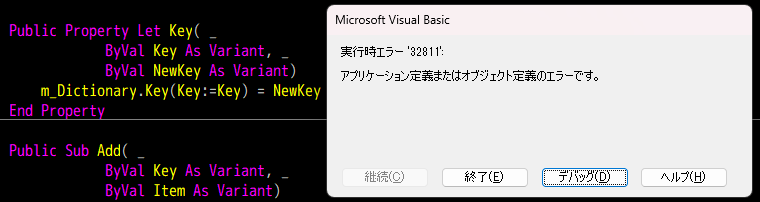
これはわかりにくい……。
というわけで、親切な例外を吐くようにしましょう。
リスト1改
Public Property Let Key( _
            ByVal Key As Variant, _
            ByVal NewKey As Variant)
    Const ERR_SOURCE As String = "Key property(Let)"

    If Not m_Dictionary.Exists(Key:=Key) Then _
        Call RaiseError(ERR_SOURCE, "存在しないキーを指定してはいけない。")

    If m_Dictionary.Exists(Key:=NewKey) Then _
        Call RaiseError(ERR_SOURCE, "既存のキーに変更することはできない。")

    m_Dictionary.Key(Key:=Key) = NewKey
End Property
これで、
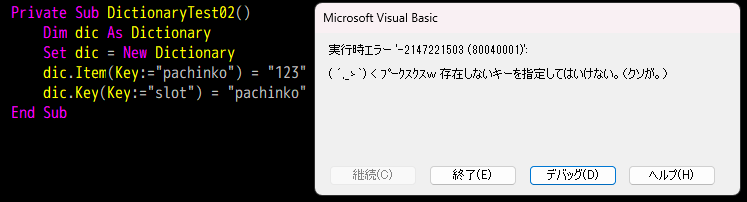
わかりやすく親切なエラーを吐くようになりました。
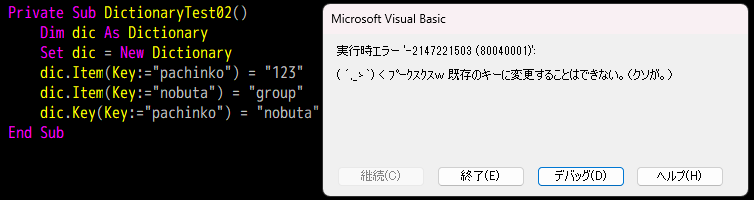
ちなみに、既存のキーに変更しようとしたときの

このエラーもわかりにくいので、ついでに対応しておきました。
おわりに
……というわけで、とりあえずKeyプロパティも実装できたことにしておきます。
これで主要なメソッド、プロパティが出揃ってきた感じになりましたね。
次回はRemove()メソッドですね。
今回終了時点でのDictionaryモジュールのソースコード
ソースコードを
Option Explicit

Public Enum CompareMethod
    BinaryCompare = 0
    TextCompare = 1
    DatabaseCompare = 2
End Enum

Private m_Dictionary As Object

Private Sub Class_Initialize()
    Set m_Dictionary = CreateObject("Scripting.Dictionary")
End Sub

Public Property Get CompareMode() As CompareMethod
    CompareMode = m_Dictionary.CompareMode
End Property

Public Property Let CompareMode(ByVal CompareMode As CompareMethod)
    Const ERR_SOURCE As String = "`CompareMode` property(Let)"
    ' 本家Dictionaryは、要素追加後にCompareModeを設定しようとするとエラーになる
    '   -> ちょっと親切なエラーを吐く
    If m_Dictionary.Count > 0 Then
        Call RaiseError( _
            a_Source:=ERR_SOURCE, _
            a_Description:="要素追加後にCompareModeの変更はできない。")
    End If
    m_Dictionary.CompareMode = CompareMode
End Property

Public Property Get Count() As Long
    Count = m_Dictionary.Count
End Property

Public Property Get Item(ByVal Key As Variant) As Variant
    If IsObject(m_Dictionary.Item(Key:=Key)) Then
        Set Item = m_Dictionary.Item(Key:=Key)
    Else
        Item = m_Dictionary.Item(Key:=Key)
    End If
End Property

Public Property Let Item( _
            ByVal Key As Variant, _
            ByVal Item As Variant)
    Const ERR_SOURCE As String = "Item property(Let)"
    ' オブジェクトが渡された
    If IsObject(Item) Then _
        Call RaiseError( _
            a_Source:=ERR_SOURCE, _
            a_Description:="オブジェクトを渡すときは`Set`を使わなければいけない。")

    m_Dictionary.Item(Key:=Key) = Item
End Property

Public Property Set Item( _
            ByVal Key As Variant, _
            ByVal Item As Variant)
    Const ERR_SOURCE As String = "Item property(Set)"

    Set m_Dictionary.Item(Key:=Key) = Item
End Property

Public Property Let Key( _
            ByVal Key As Variant, _
            ByVal NewKey As Variant)
    Const ERR_SOURCE As String = "Key property(Let)"

    If Not m_Dictionary.Exists(Key:=Key) Then _
        Call RaiseError(ERR_SOURCE, "存在しないキーを指定してはいけない。")

    If m_Dictionary.Exists(Key:=NewKey) Then _
        Call RaiseError(ERR_SOURCE, "既存のキーに変更することはできない。")

    m_Dictionary.Key(Key:=Key) = NewKey
End Property

Public Sub Add( _
            ByVal Key As Variant, _
            ByVal Item As Variant)
    Const ERR_SOURCE As String = "Add() method(Sub)"

    ' 既存のキーにアイテムを設定しようとした
    If m_Dictionary.Exists(Key) Then
        Call RaiseError( _
            a_Source:=ERR_SOURCE, _
            a_Description:="既存のキーにはアイテムを設定できない。")
    End If

    Call m_Dictionary.Add( _
        Key:=Key, _
        Item:=Item)
End Sub

Public Function Exists(ByVal Key As Variant) As Boolean
    Exists = m_Dictionary.Exists(Key)
End Function

Private Sub RaiseError( _
            ByVal a_Source As String, _
            ByVal a_Description As String)
        ' エラーオブジェクトに渡すパラメータを用意
    Dim errNum As Long, errDesc As String, errSrc As String
    errNum = vbObjectError + 1
    errSrc = "Dictionary class: " & a_Source
    errDesc = "( ´,_ゝ`) < プークスクスw " & a_Description & "(クソが。)"

    ' 例外スロー
    Call Err.Raise( _
        Number:=errNum, _
        Source:=errSrc, _
        Description:=errDesc)
End Sub