カスタムDictionaryクラスを作ろう(11)
前回の続きです。
過去記事
現時点のソースコードです。
現時点のDictionaryモジュール
ソースコードを
Option Explicit

Public Enum CompareMethod
    BinaryCompare = 0
    TextCompare = 1
    DatabaseCompare = 2
End Enum

Private m_Dictionary As Object

Private Sub Class_Initialize()
    Set m_Dictionary = CreateObject("Scripting.Dictionary")
End Sub

Public Property Get CompareMode() As CompareMethod
    CompareMode = m_Dictionary.CompareMode
End Property

Public Property Let CompareMode(ByVal CompareMode As CompareMethod)
    Const ERR_SOURCE As String = "`CompareMode` property(Let)"
    ' 本家Dictionaryは、要素追加後にCompareModeを設定しようとするとエラーになる
    '   -> ちょっと親切なエラーを吐く
    If m_Dictionary.Count > 0 Then
        Call RaiseError( _
            a_Source:=ERR_SOURCE, _
            a_Description:="要素追加後にCompareModeの変更はできない。")
    End If
    m_Dictionary.CompareMode = CompareMode
End Property

Public Property Get Count() As Long
    Count = m_Dictionary.Count
End Property

Public Property Get Item(ByVal Key As Variant) As Variant
    If IsObject(m_Dictionary.Item(Key:=Key)) Then
        Set Item = m_Dictionary.Item(Key:=Key)
    Else
        Item = m_Dictionary.Item(Key:=Key)
    End If
End Property

Public Property Let Item( _
            ByVal Key As Variant, _
            ByVal Item As Variant)
    Const ERR_SOURCE As String = "Item property(Let)"
    ' オブジェクトが渡された
    If IsObject(Item) Then _
        Call RaiseError( _
            a_Source:=ERR_SOURCE, _
            a_Description:="オブジェクトを渡すときは`Set`を使わなければいけない。")

    m_Dictionary.Item(Key:=Key) = Item
End Property

Public Property Set Item( _
            ByVal Key As Variant, _
            ByVal Item As Variant)
    Const ERR_SOURCE As String = "Item property(Set)"

    Set m_Dictionary.Item(Key:=Key) = Item
End Property

Public Property Let Key( _
            ByVal Key As Variant, _
            ByVal NewKey As Variant)
    Const ERR_SOURCE As String = "Key property(Let)"

    If Not m_Dictionary.Exists(Key:=Key) Then _
        Call RaiseError(ERR_SOURCE, "存在しないキーを指定してはいけない。")

    If m_Dictionary.Exists(Key:=NewKey) Then _
        Call RaiseError(ERR_SOURCE, "既存のキーに変更することはできない。")

    m_Dictionary.Key(Key:=Key) = NewKey
End Property

Public Sub Add( _
            ByVal Key As Variant, _
            ByVal Item As Variant)
    Const ERR_SOURCE As String = "Add() method(Sub)"

    ' 既存のキーにアイテムを設定しようとした
    If m_Dictionary.Exists(Key) Then
        Call RaiseError( _
            a_Source:=ERR_SOURCE, _
            a_Description:="既存のキーにはアイテムを設定できない。")
    End If

    Call m_Dictionary.Add( _
        Key:=Key, _
        Item:=Item)
End Sub

Public Function Exists(ByVal Key As Variant) As Boolean
    Exists = m_Dictionary.Exists(Key)
End Function

Public Sub Remove(ByVal Key As Variant)
    Const ERR_SOURCE As String = "Remove() method"
    If Not m_Dictionary.Exists(Key:=Key) Then _
        Call RaiseError(ERR_SOURCE, "存在しないキーを指定してはいけない。")

    Call m_Dictionary.Remove(Key:=Key)
End Sub

Public Sub RemoveAll()
    Call m_Dictionary.RemoveAll
End Sub

Private Sub RaiseError( _
            ByVal a_Source As String, _
            ByVal a_Description As String)
        ' エラーオブジェクトに渡すパラメータを用意
    Dim errNum As Long, errDesc As String, errSrc As String
    errNum = vbObjectError + 1
    errSrc = "Dictionary class: " & a_Source
    errDesc = "( ´,_ゝ`) < プークスクスw " & a_Description & "(クソが。)"

    ' 例外スロー
    Call Err.Raise( _
        Number:=errNum, _
        Source:=errSrc, _
        Description:=errDesc)
End Sub
Keys()メソッドの実装
まずは、仕様の確認ですね。
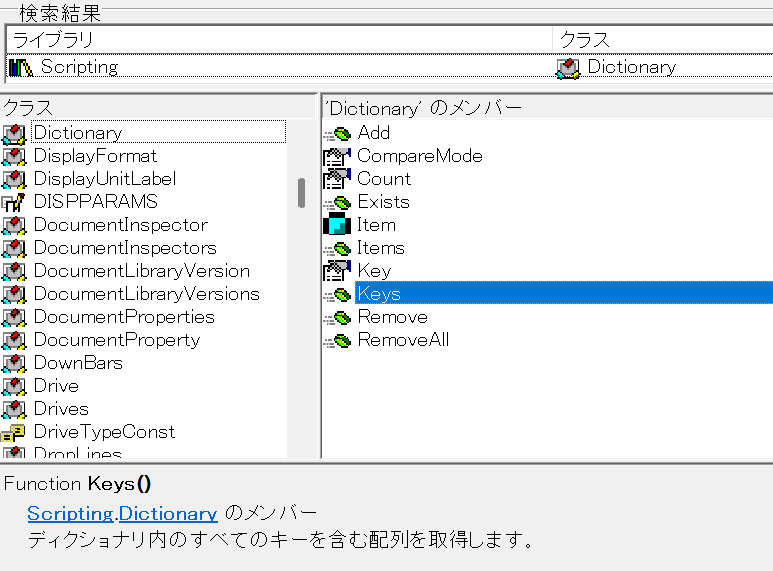
Function Keys()
Scripting.Dictionaryのメンバーディクショナリ内のすべてのキーを含む配列を取得します。
むむむ……。配列だったのか……。
てっきりCollectionだと思っておったわ……。
Keys()メソッドを実装する
とりあえず、オブジェクト ブラウザーの情報をもとに実装してみましょう。
リスト1
Public Function Keys() As Variant
    Keys = m_Dictionary.Keys
End Function
当然こうなります。
Keys()メソッドの動作確認
では、動作確認をしてみましょう。
DictionaryクラスのKeys()メソッドの何がうれしいかというと、
For Each ... Nextループで回せること
なわけです。
リスト1-1
Private Sub DictionaryTest01()
    Dim dic As Dictionary
    Set dic = New Dictionary
    Call dic.Add(Key:="pachinko", Item:=123)
    Call dic.Add(Key:="slot", Item:="123")
    Call dic.Add(Key:="nobuta", Item:="group")
    Dim k As Variant
    For Each k In dic.Keys()
        Debug.Print k
    Next
End Sub
こいつを実行してみると……。
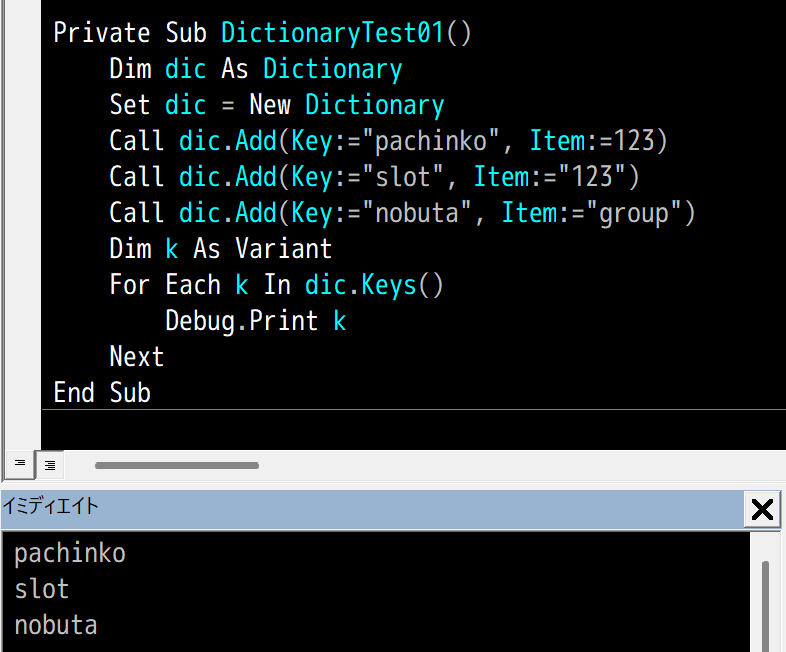
なんと、あっさり成功……。
まっ たく 簡 単 だ
……ということは、Items()メソッドも同じやり方でいけそうですね。
Items()メソッドの実装
例によって仕様の確認。
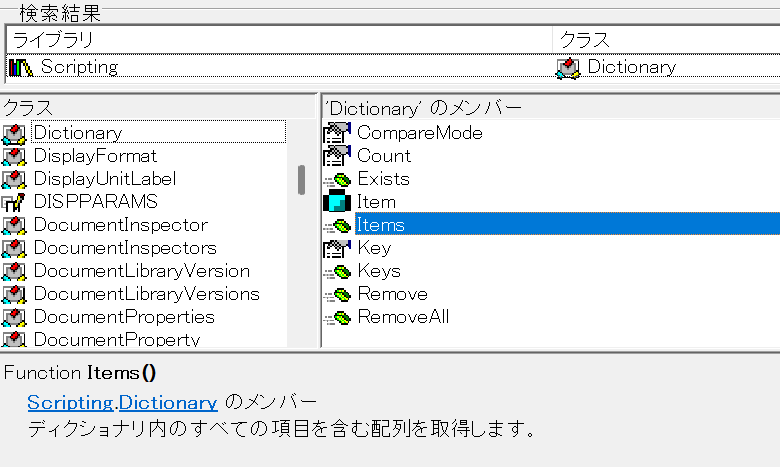
Function Items()
Scripting.Dictionaryのメンバーディクショナリ内のすべての項目を含む配列を取得します。
もうまったく同じやり方でいけそうですね。
リスト2
Public Function Items() As Variant
    Items = m_Dictionary.Items
End Function
もはや動作確認はめんどくさいから省略。
これで良いはずです。
おわりに
というわけで、カスタムDictionaryクラスはめでたく完成しました。
Keys()やItems()がVariant()を返すおかげで、NewEnum()とか実装しなくてもFor Each ... Nextによるイテレートができるなんて、ちょっと意外でした。
Variantってめちゃくちゃ便利だったんですね……。
あとは、次回、ちょっとした仕上げをしておくことにしましょう。
とりあえず完成したDictionaryモジュールのソースコード
ソースコードを
Option Explicit

Public Enum CompareMethod
    BinaryCompare = 0
    TextCompare = 1
    DatabaseCompare = 2
End Enum

Private m_Dictionary As Object

Private Sub Class_Initialize()
    Set m_Dictionary = CreateObject("Scripting.Dictionary")
End Sub

Public Property Get CompareMode() As CompareMethod
    CompareMode = m_Dictionary.CompareMode
End Property

Public Property Let CompareMode(ByVal CompareMode As CompareMethod)
    Const ERR_SOURCE As String = "`CompareMode` property(Let)"
    ' 本家Dictionaryは、要素追加後にCompareModeを設定しようとするとエラーになる
    '   -> ちょっと親切なエラーを吐く
    If m_Dictionary.Count > 0 Then
        Call RaiseError( _
            a_Source:=ERR_SOURCE, _
            a_Description:="要素追加後にCompareModeの変更はできない。")
    End If
    m_Dictionary.CompareMode = CompareMode
End Property

Public Property Get Count() As Long
    Count = m_Dictionary.Count
End Property

Public Property Get Item(ByVal Key As Variant) As Variant
    If IsObject(m_Dictionary.Item(Key:=Key)) Then
        Set Item = m_Dictionary.Item(Key:=Key)
    Else
        Item = m_Dictionary.Item(Key:=Key)
    End If
End Property

Public Property Let Item( _
            ByVal Key As Variant, _
            ByVal Item As Variant)
    Const ERR_SOURCE As String = "Item property(Let)"
    ' オブジェクトが渡された
    If IsObject(Item) Then _
        Call RaiseError( _
            a_Source:=ERR_SOURCE, _
            a_Description:="オブジェクトを渡すときは`Set`を使わなければいけない。")

    m_Dictionary.Item(Key:=Key) = Item
End Property

Public Property Set Item( _
            ByVal Key As Variant, _
            ByVal Item As Variant)
    Const ERR_SOURCE As String = "Item property(Set)"

    Set m_Dictionary.Item(Key:=Key) = Item
End Property

Public Property Let Key( _
            ByVal Key As Variant, _
            ByVal NewKey As Variant)
    Const ERR_SOURCE As String = "Key property(Let)"

    If Not m_Dictionary.Exists(Key:=Key) Then _
        Call RaiseError(ERR_SOURCE, "存在しないキーを指定してはいけない。")

    If m_Dictionary.Exists(Key:=NewKey) Then _
        Call RaiseError(ERR_SOURCE, "既存のキーに変更することはできない。")

    m_Dictionary.Key(Key:=Key) = NewKey
End Property

Public Sub Add( _
            ByVal Key As Variant, _
            ByVal Item As Variant)
    Const ERR_SOURCE As String = "Add() method(Sub)"

    ' 既存のキーにアイテムを設定しようとした
    If m_Dictionary.Exists(Key) Then
        Call RaiseError( _
            a_Source:=ERR_SOURCE, _
            a_Description:="既存のキーにはアイテムを設定できない。")
    End If

    Call m_Dictionary.Add( _
        Key:=Key, _
        Item:=Item)
End Sub

Public Function Exists(ByVal Key As Variant) As Boolean
    Exists = m_Dictionary.Exists(Key)
End Function

Public Function Keys() As Variant
    Keys = m_Dictionary.Keys
End Function

Public Function Items() As Variant
    Items = m_Dictionary.Items
End Function

Public Sub Remove(ByVal Key As Variant)
    Const ERR_SOURCE As String = "Remove() method"
    If Not m_Dictionary.Exists(Key:=Key) Then _
        Call RaiseError(ERR_SOURCE, "存在しないキーを指定してはいけない。")

    Call m_Dictionary.Remove(Key:=Key)
End Sub

Public Sub RemoveAll()
    Call m_Dictionary.RemoveAll
End Sub

Private Sub RaiseError( _
            ByVal a_Source As String, _
            ByVal a_Description As String)
        ' エラーオブジェクトに渡すパラメータを用意
    Dim errNum As Long, errDesc As String, errSrc As String
    errNum = vbObjectError + 1
    errSrc = "Dictionary class: " & a_Source
    errDesc = "( ´,_ゝ`) < プークスクスw " & a_Description & "(クソが。)"

    ' 例外スロー
    Call Err.Raise( _
        Number:=errNum, _
        Source:=errSrc, _
        Description:=errDesc)
End Sub